How to email a document from monday.com with your Gmail
PDF Docs, Invoices + eSignatures · Updated
Short answer
On Send an email, press Connect Gmail once. Then pick an email template under Which email?, pick the item, check the address and press Send it. To attach a document, make it first and press Email it.
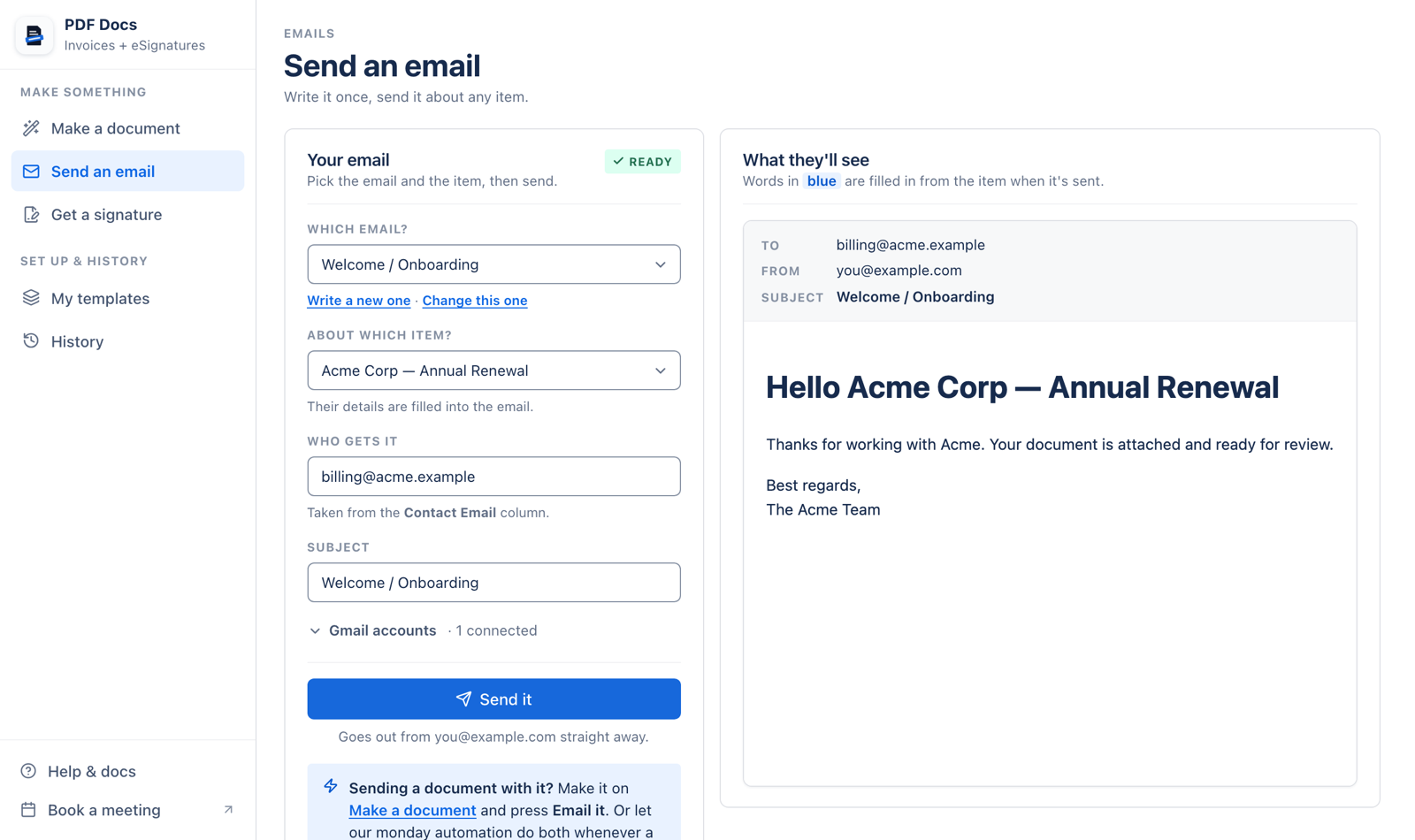
Steps
- 1Connect Gmail (once) and choose the account to send from.
- 2Pick the email, or press Write a new one.
- 3Pick the item. Its details fill the email.
- 4Check who gets it. The address comes from the item's Email column; you can type another.
- 5Send it.
Email fields
In emails, every space or symbol in a column name becomes an underscore and capitals must match: {{Item.Due_Date}}, {{Item.Client_E_mail}}. In the subject, use three brackets for names with & or an apostrophe: {{{Item.Name}}}.
Attachments can be up to 20 MB. More: email PDFs from monday.com automatically.
Related articles
Still stuck? Email support@fortimus.co or book a 15-minute call. Don’t have the app yet? Add PDF Docs to monday.com.