How to generate a PDF from a monday.com item
By Arnav Ghatage, founder of Fortimus · Updated
Short answer
Add the PDF Docs view to your board, choose a document (an invoice, quote, NDA, item summary or your own Word template), choose the item and press Make PDF. The app fills the document from the item's columns and saves the PDF in the item's file column, ready to download, email or send for signature.
Turning a monday.com item into a clean PDF is one of the most requested things in the monday community. Teams want a quote from a deal, a work order from a job, a summary of a project for a client, without copying values into Word by hand.
This guide covers what monday.com can do on its own, then walks through making a PDF from an item with PDF Docs, which Fortimus builds.
Can monday.com export an item to PDF on its own?
Partly. monday.com can export a board to Excel, and you can print some views from your browser. What it does not do is fill a designed document, such as a branded quote or a contract, with the values from one item's columns and save the result back on the item. For that you need a document app from the monday.com marketplace.
| Option | Good for | Limits |
|---|---|---|
| Export the board to Excel | Data for a spreadsheet or another tool | Not a formatted document; one row per item |
| Print from the browser | A quick paper copy of a view | Prints the screen, not a branded document; nothing saved on the item |
| A document app | Quotes, invoices, contracts and reports filled from columns | Needs an install; check how documents are counted on its plans |
Set up the app (once)
- 1Install PDF Docs, Invoices + eSignatures from the monday.com marketplace.
- 2Add the view to your board: click + next to the board's views, choose Apps, then PDF Docs, Invoices + eSignatures.
- 3Connect once: the first time it opens, press Connect to monday and approve. Everyone on your account can then use it.
Note: Viewers cannot use the app, because it needs someone who can edit the board.
Make your first PDF
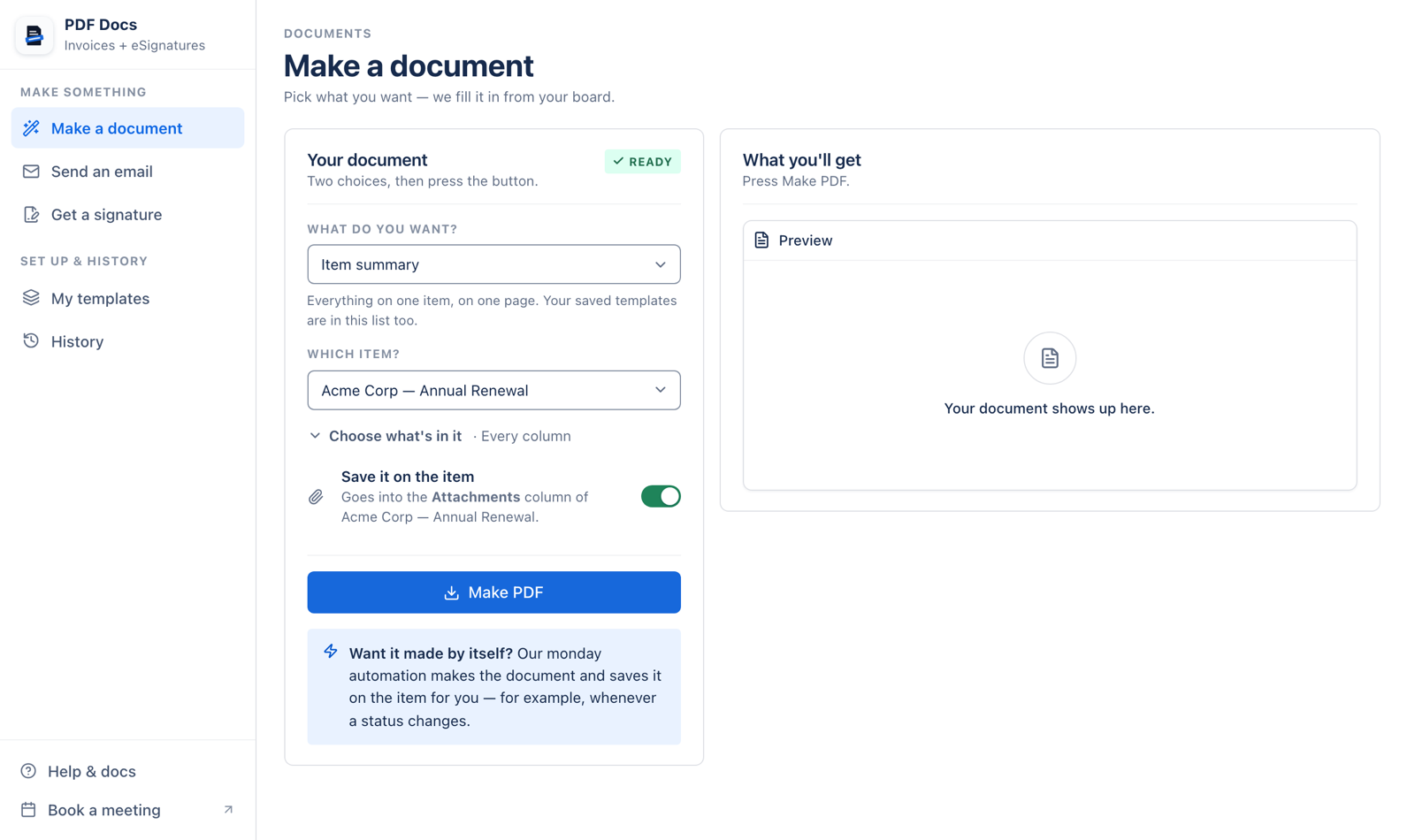
- 1Choose what you want under What do you want? Ready-made documents come first, then your own templates.
- 2Choose the item under Which item? Its details are filled into the document.
- 3Choose what is in it (optional). For an Item summary, tick the columns you want, add a table of subitems, or add items from a Connect boards column.
- 4Check the fields. If the app cannot match a field to a column, it lists it. Press Fill them in to pick a column for each.
- 5Leave Save it on the item switched on to put the PDF in the item's file column.
- 6Press Make PDF.
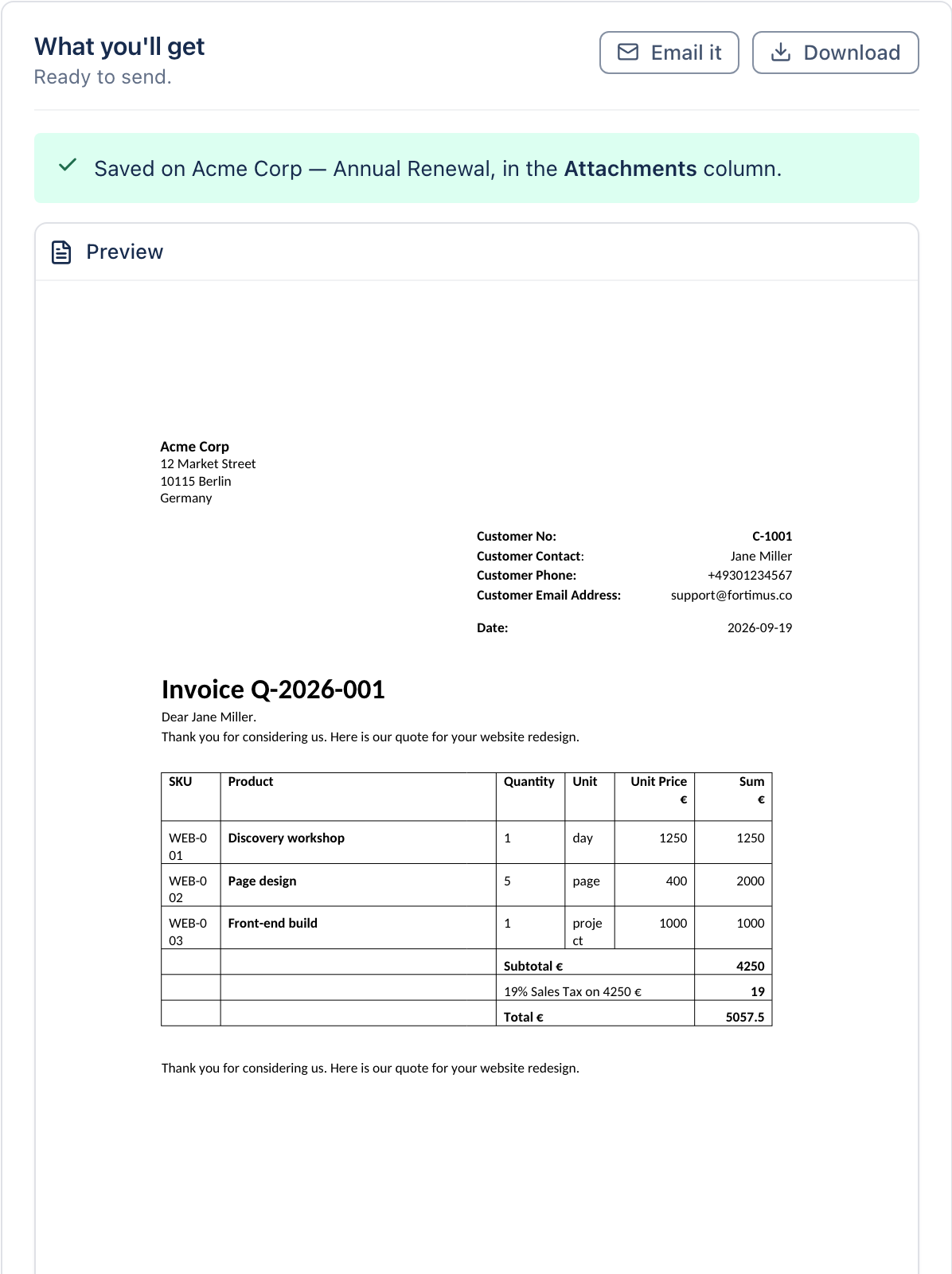
From here you can download it, press Email it to send it from your Gmail with the PDF attached, or get the Word (.docx) version for documents that come as Word.
Which document should you start with?
| Document | Makes | Needs |
|---|---|---|
| Item summary | One item on one page: every column and its value, plus its updates | Nothing |
| Invoice or quote | A quote or invoice with one line per subitem | Customer and total columns, and subitems for the lines |
| NDA | A non-disclosure agreement ready to sign | Name, address and purpose columns |
| Event ticket | An admission ticket with a QR code | Name and date columns |
| Board report | Every item on the board, grouped like the board, with status colours | Nothing |
| Your own Word or PDF | Anything: proposals, work orders, certificates, letters | A template with fields |
Field names for each ready-made document are in the setup guide. For anything else, build a Word template.
Make your first PDF in about two minutes.
Add PDF Docs to monday.comMake PDFs automatically
You do not have to press the button each time. On your board, open Automate, search for PDF Docs and pick a recipe, for example When status changes to Done, create a PDF. Recipes can also email the PDF, save it to Google Drive or send it for signature. See how to email PDFs automatically.
Need the whole board, not one item?
Choose Board report instead of an item document. It puts every item on one PDF, grouped like your board. Read how to export a monday.com board to PDF.
Frequently asked questions
How do I export a monday.com item to PDF?
Install a document app such as PDF Docs, add its view to the board, choose a document and the item, and press Make PDF. The PDF is filled from the item's columns and saved on the item.
Can I export a monday.com item to Word?
Yes. Documents that come as Word give you a .docx file below the preview, so you can edit it before sending.
Are subitems included in the PDF?
They can be. An Item summary can include a table of subitems, an invoice uses one subitem per line, and Word templates can repeat a row for each subitem.
Where is the PDF saved?
In the item's file column, if you leave Save it on the item switched on. If the board has more than one file column, you choose which one.
How many PDFs can I make?
Plans include 50, 250, 500, 1,000, 5,000 or unlimited documents per billing period. Each document made counts as one.