How to get documents signed in monday.com
By Arnav Ghatage, founder of Fortimus · Updated
Short answer
monday.com has no built-in eSignature, so you need an app or an integration. With PDF Docs, you set up a signature template once (a Word file with {{Signature}} or a PDF with signature boxes), then pick the item and the signers and press Send for signing. Signers sign in the browser with no account, and the signed PDF and signing record are saved back on the item.
"Can I get this signed without leaving monday?" comes up in every sales, HR and agency board. The answer used to be a Zapier chain to a separate signing tool. Today you can keep the whole thing on the item.
Your options for eSignatures in monday.com
| Option | How it works | Watch out for |
|---|---|---|
| Separate signing tool + integration | DocuSign, PandaDoc and others connect to monday.com directly or through Zapier or Make | Two subscriptions, and the document is built outside monday.com |
| Signing app from the marketplace | The document is filled from the item and sent for signing inside monday.com | Check how signatures are counted on each plan |
| PDF Docs | Make, send and sign in one app, from your own Gmail | No signing order: everyone gets the link at once |
Step 1: Set up a signature template
A signature template is a Word file or a PDF with places for signatures. You set it up once and reuse it for every item.
- Word file: type
{{Signature}}where the signature goes and{{Date}}for the date of signing. For several people, number them:{{Signature1}}and{{Date1}},{{Signature2}}and{{Date2}}. Any other field, like{{Item.Client}}, works too. - PDF: upload it and drag up to 5 Signature boxes onto the page, plus any fields.
In the app, open Get a signature and choose Set up a new one from a Word file or a PDF.
Note: Put signature fields in the main text, not in a header or footer. The app counts the signers from the main text.
Step 2: Send it for signing
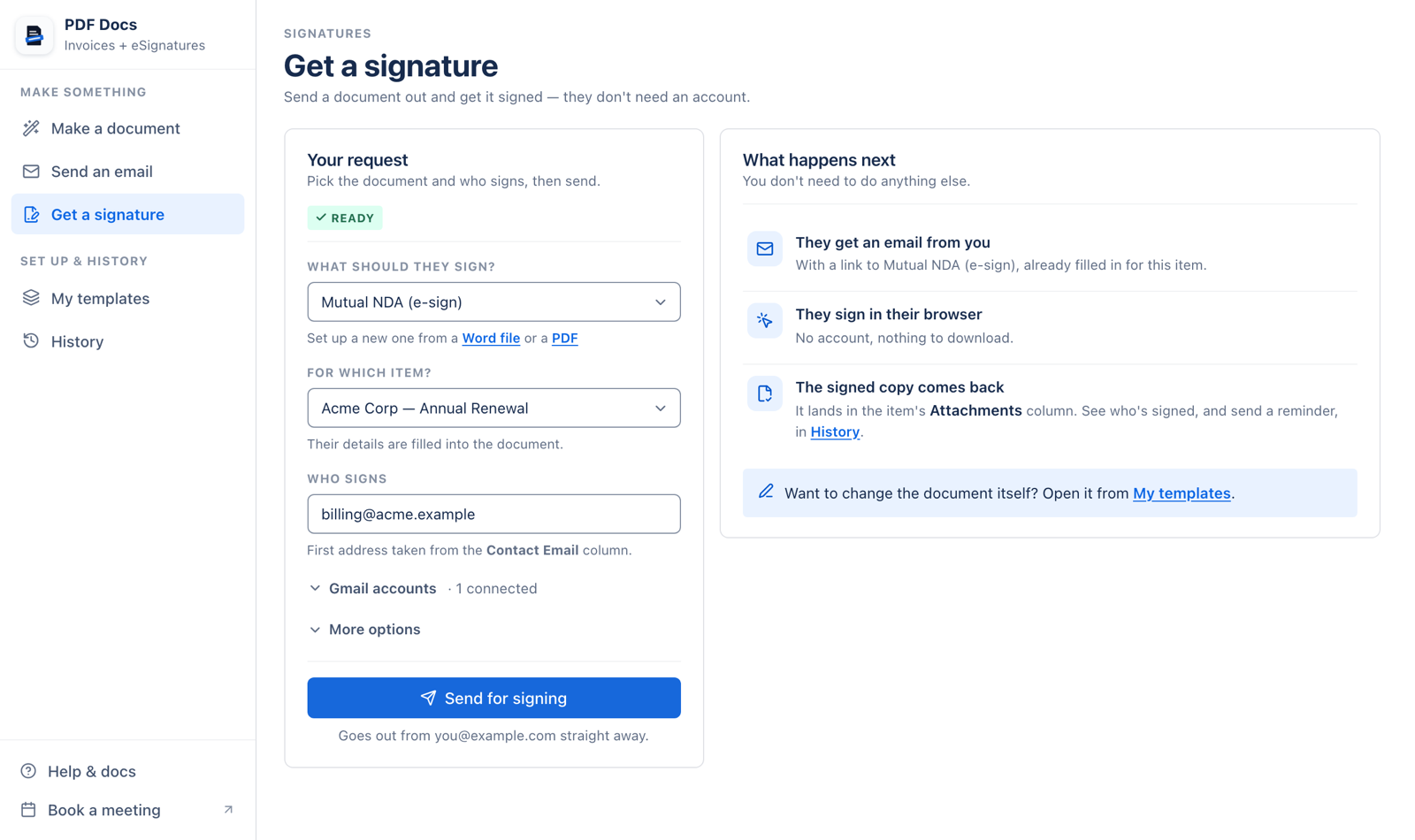
- 1What should they sign? Pick the signature template.
- 2For which item? Its details are filled into the document before it goes out.
- 3Who signs: one email address per signer. The first comes from the item's Email column if it has one.
- 4More options (optional): the email they receive, which file column gets the signed copy, and whether to keep a copy from before signing.
- 5Press Send for signing. Everyone gets their own link at the same time.
Step 3: What the signer sees
- An email from your Gmail with a Review and Sign button.
- The document in their browser. No account, nothing to install, and it works on a phone.
- They draw their signature, or type their name and pick a style, then press Submit signature.
Step 4: When everyone has signed
- The signed PDF is saved on the item, in the column you chose.
- A signing record is saved too, showing who opened and signed the document, when, and from which IP address.
- In History, each request shows how many people have signed. Press Remind to send the link again (at most once an hour).
Sending a signature request from the app does not count against your plan. There is no separate signature allowance.
Send your first document for signature today.
Add PDF Docs to monday.comSend for signature automatically
The recipe Send a contract for signature makes the document and sends it when, for example, a deal moves to Won. It needs a Word signature template and one Email column per signer. See contracts and NDAs from monday.com for a full setup.
Good to know
- Signing links do not expire.
- There is no decline button. If someone no longer needs to sign, let them know yourself.
- All signers receive their link at the same time; there is no signing order.
Frequently asked questions
Does monday.com have a built-in eSignature?
No. monday.com does not include eSignatures natively. You can add them with a marketplace app or by connecting a separate signing service.
Do signers need a monday.com account?
No. They receive an email link, open the document in a browser and sign there.
Can more than one person sign?
Yes. Number the signature fields in a Word template ({{Signature1}}, {{Signature2}} and so on), or place up to 5 signature boxes on a PDF.
Is there an audit trail?
Yes. A signing record is saved on the item showing who opened and signed the document, when, and from which IP address.
How many signatures can I send?
In PDF Docs, signature requests sent from the app do not count against your plan. The automation that makes and sends a contract counts as one document.
Is it legally binding?
Electronic signatures are accepted for most business agreements in many countries, but rules vary by country and document type. Check with your legal adviser for documents with special requirements.