PDF Docs, Invoices + eSignatures
PDF Docs, Invoices + eSignatures: make, send and sign documents from monday.com items
Make it. Send it.
Get it signed.
Turn board items into clean PDFs and Word files: quotes, invoices, contracts and NDAs. Then email them from your own Gmail and get them signed, right inside monday.com.
Teams around the globe run on Fortimus apps



From item to document in one click
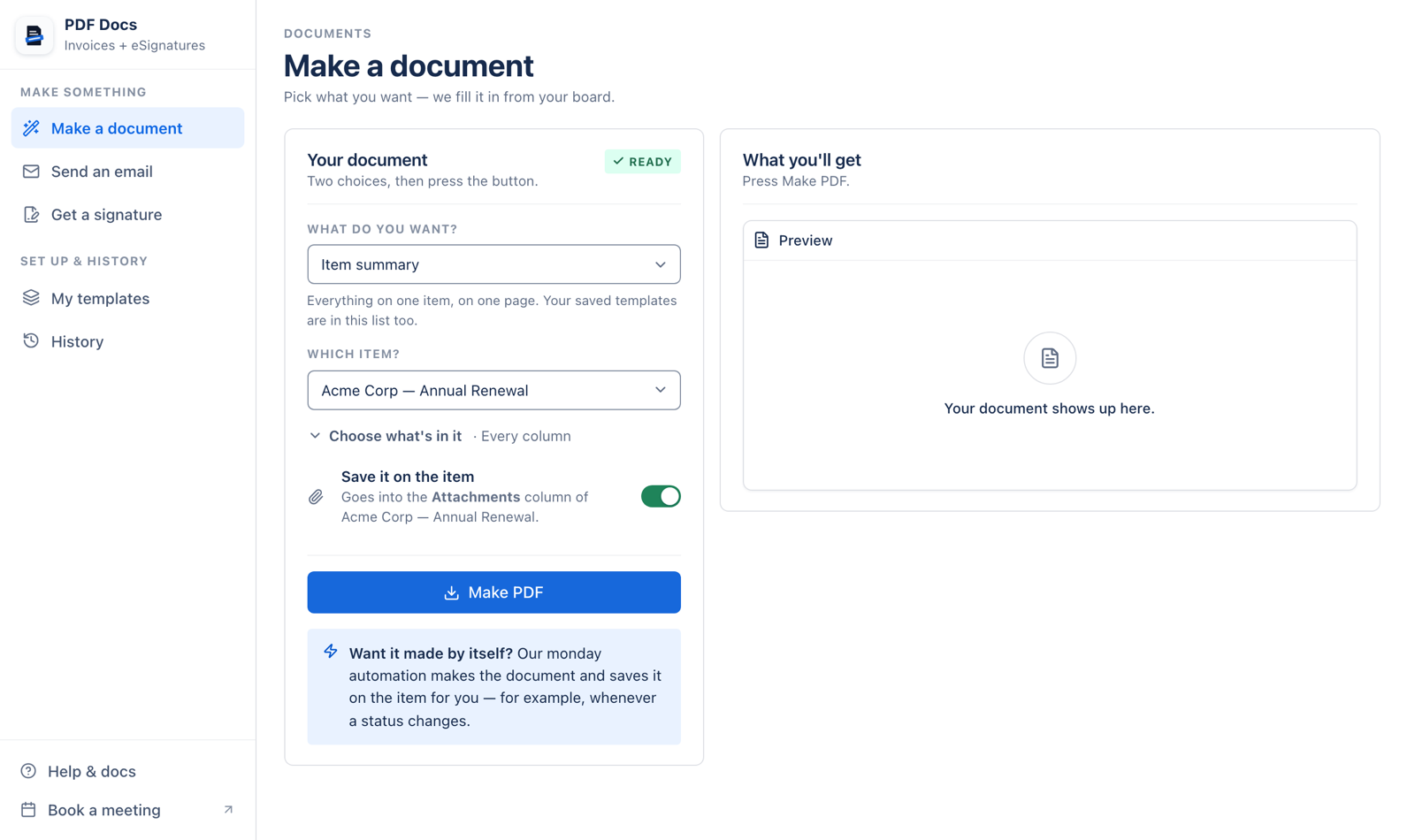
Two choices and a button. The app fills in the rest from your columns.
What do you want?
Invoice or quote ▾Step 1
Choose what you want
An invoice, a quote, an NDA, a ticket, an item summary or board report, or your own template.
Which item?
Acme Corp, Annual Renewal ▾Step 2
Choose the item
Its details are filled in from your columns. Anything the app can’t find, you pick by hand.
- Make PDF
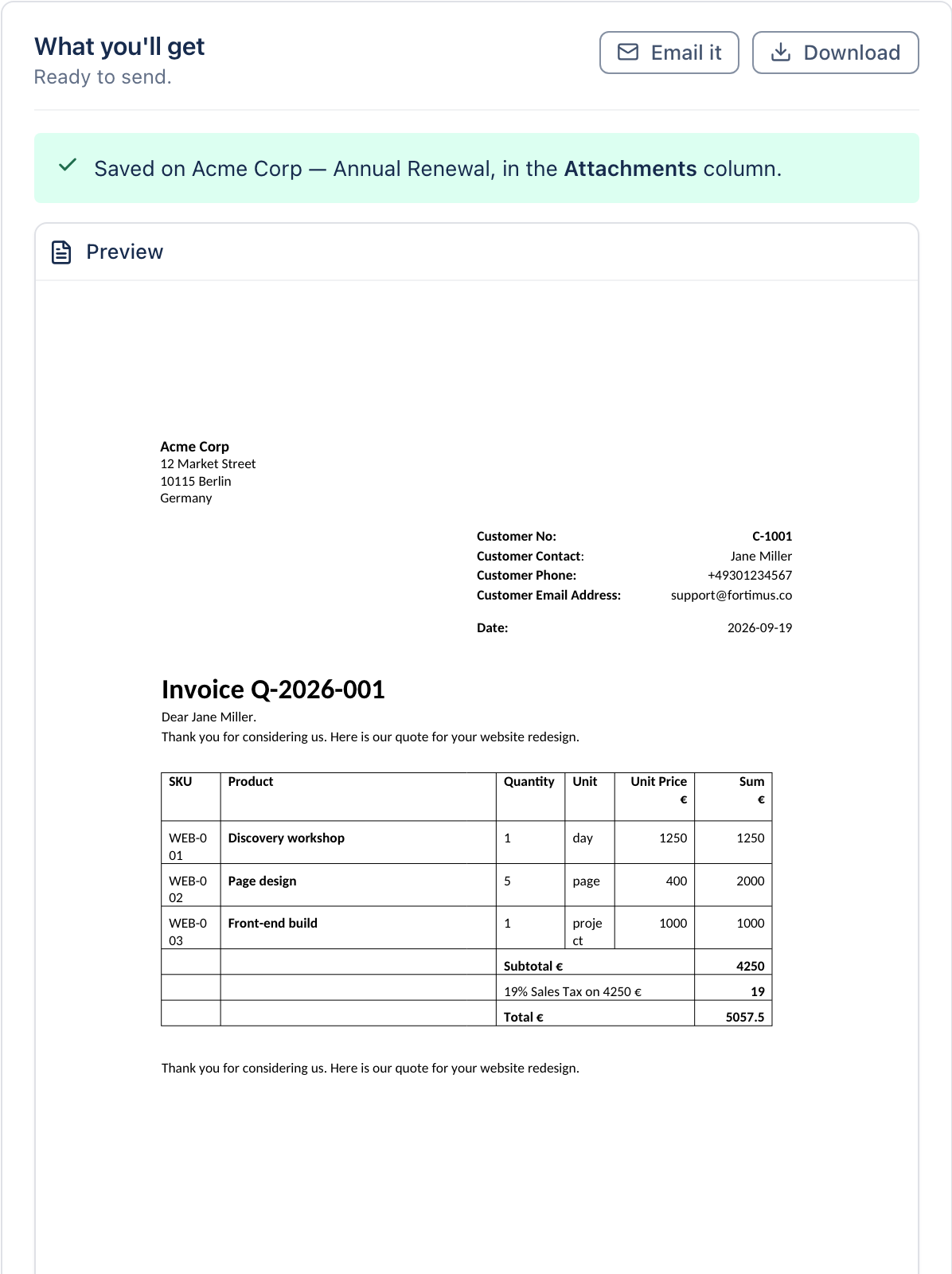
Saved on the item
Step 3
Press Make PDF
The document appears in the preview. Leave Save it on the item switched on and it goes into the item’s file column.
Mutual NDA 2 of 2 signed
Jordan Lee
Step 4
Email it or get it signed
Send it from your own Gmail, or send it out for signing. Signers need no account.
No more copy-pasting.
The board writes the document.
Stop retyping client details into a word processor. The document, the email and the signature all come from the item, and end up back on it.
Filled in from your board
Column names match the document’s fields, so the client, the lines and the totals come straight from the item.
Saved where the work is
PDFs go into the item’s file column, and History shows what was made, where it went and who still has to sign.
Signed in the browser
Signers get a Review and Sign link by email. No monday.com account and nothing to install.
Every document job, in one app
Make it, send it, get it signed, and see everything that went out.
Choose what you want and which item, then press Make PDF. The document is filled in from the item’s columns and can be saved straight onto the item. Documents that come as Word also give you the .docx.
- Five ready-made documents, no setup
- Your own Word or PDF templates
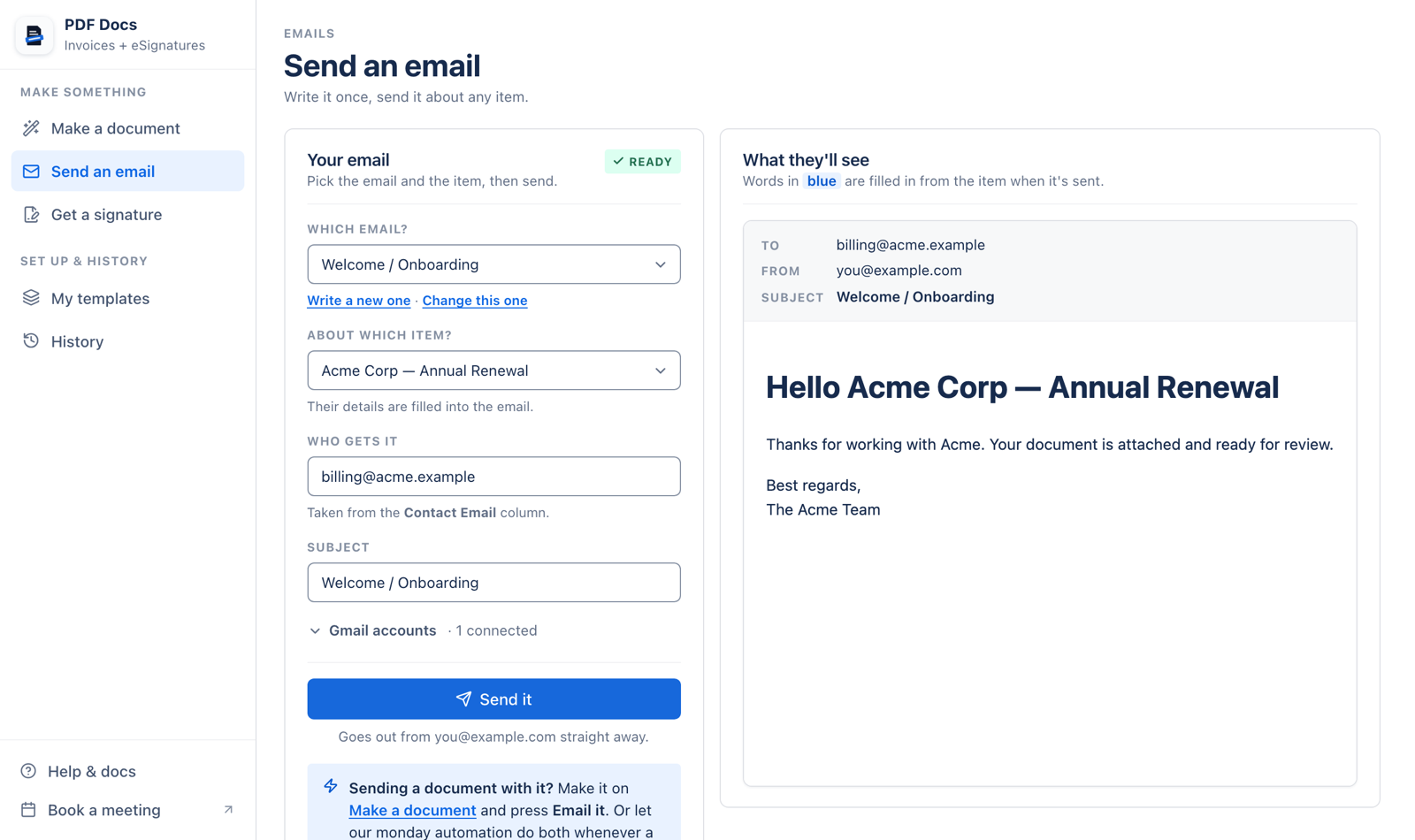
Write a personal email from your own Gmail, filled in from the item, with the document attached. Save emails as templates, or let the AI assistant write a first draft.
- Your Gmail, not a no-reply address
- Attachments up to 20 MB
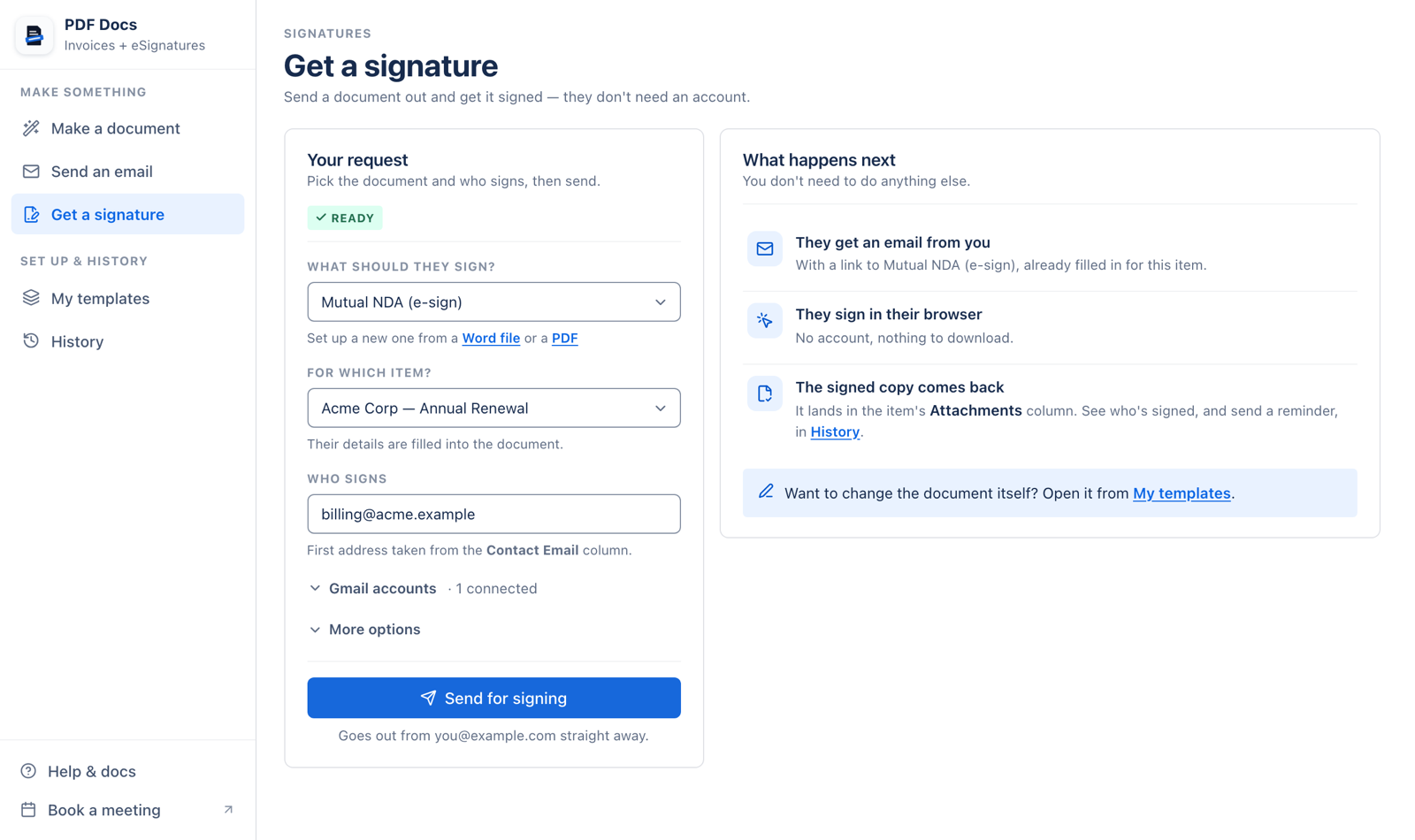
Send a document out for signing to everyone who needs to sign, each with their own link. When everyone has signed, the signed PDF and a signing record are saved on the item.
- Signers draw or type their signature
- Remind anyone who hasn’t signed yet
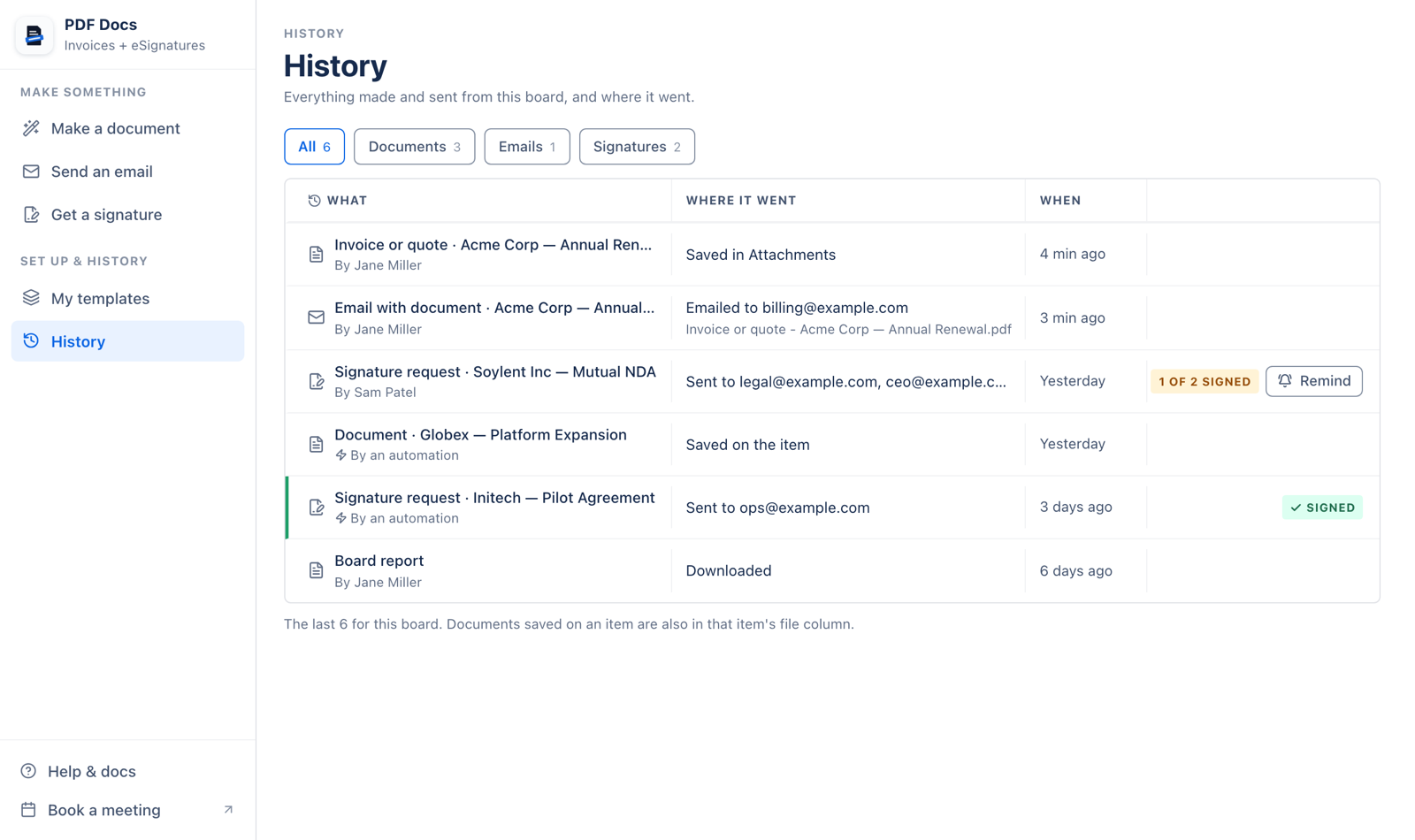
History lists everything made and sent from the board: documents, emails, and signature requests with how many people have signed. My templates holds every template your team has set up.
- Filter by documents, emails or signatures
- Templates shared across your account
Ready when you are
Five documents work with no setup. Name your columns like their fields and they fill themselves in.
Invoice #1042
Invoice or quote
One line for each subitem, with the customer’s details and totals from your columns.
See the fields it usesMutual NDA
Jordan Lee
NDA
A non-disclosure agreement filled in from the item, ready to send for signing.
See the fields it usesAdmission
Event ticket
An admission ticket with a QR code that opens a link or text from the item.
See the fields it usesAcme Corp
Item summary
One item on one page: every column and its value, and the item’s updates.
See the ready-made documentsQ4 board report
Board report
Every item on the board, grouped like your board, with status colours.
See the ready-made documentsPrepared for {{Item.Client}}
Date: {{Today}}
Your own template
Upload a Word file with fields like {{Item.Client}}, or place fields on top of your own PDF.
Use your own Word templateDocuments that
make themselves
On your board, open Automate, search for PDF Docs and pick a recipe. Documents are made, saved, emailed or sent for signing on their own, for example when a status changes.
See the automations- Create a PDF
- Create a PDF and email it
- Create a PDF and email it to the Email column
- Create a PDF and save it in Google Drive
- Create a PDF and save it in the folder from a Link column
- Send a contract for signature
Built for the documents teams send
Quotes from the deal
Each subitem becomes a line on the quote, and the customer’s details come from the deal item. Email it from your Gmail in the same flow.
Set up quotes and invoicesContracts, signed on the item
Send an NDA or contract for signing. The signed PDF and its signing record land back on the item.
Get a signatureDocuments on autopilot
When a status changes, the document is made, saved to a file column or Google Drive, and emailed, with nobody pressing a button.
See the automationsComparing document apps?
Coming from DocExport?
Same PDF and Word documents from your items, with eSignatures included on every plan and email from your own Gmail.
PDF Docs vs DocExportComing from GetSign?
No separate signature allowance: signature requests sent from the app don’t count against your plan.
PDF Docs vs GetSignSwitching takes an afternoon
Run both apps side by side, rebuild your templates in Word and move the automations one at a time.
How to switchEverything you need, built in
ready-made documents that work with no setup
accounts your signers need: they sign in the browser
automation recipes, from saving a PDF to sending a contract
Security and data
Where PDF Docs runs, what it can read and what signers see.
- Where it runs
- Runs on monday code, monday.com’s own app infrastructure (SOC 2, ISO 27001; GDPR and HIPAA compliant). These are monday code’s certifications.
- Board access
- It reads boards as the person who connected the app: if they cannot see a board, the app cannot either. Viewers cannot use the app.
- Emails and signature requests go from your own connected Gmail account. Disconnect an account at any time under Gmail accounts.
- Signing record
- Signers only see the document sent to them, through their own link. Each signed document keeps a record of who opened and signed it, when, and from which IP address.
Read the data and security guide Security questionnaire? Email support@fortimus.co.
Plans sized by documents
Pick how many documents you make each billing period. Emails and signature requests sent from the app don’t count.
Plans
Each plan includes 50, 250, 500, 1,000, 5,000 or unlimited documents per billing period. Every document made counts as one, in the app or by an automation.
Limits
Documents saved on an item can be up to 25 MB, and email attachments up to 20 MB. The item list shows the first 100 items on a board.
Plans and limitsQuestions, answered
All PDF Docs FAQsFortimus Apps
PDF Docs is better with the rest of the set
Built by the same team for the same boards. Put the same item on several boards, give every item a Google Drive folder, and fill monday.com’s automation gaps.
Includes
 PDF Docs + eSignatures
 Mirror Item
 Master Automations
 Google Drive Integration
 MasterForms
- PDF Docs + eSignaturesTurn items into PDFs and Word files, then get them signedYou’re here
- Mirror ItemThe same item on every board
- Master AutomationsTrigger from mirror columns and pass values down to subitems
- Google Drive IntegrationA Drive folder for every item, with files kept in sync
- MasterFormsForms built from your columns, with every response an item
Stop copy-pasting
into documents
Your first document is two choices and a button away.