Mirror Item Multiple Boards by Fortimus
Mirror Item Multiple Boards: keep one item in sync across monday.com boards
The same item.
On multiple boards.
Keep shared columns, updates and subitems in sync across your team, client and master boards. Each mirrored item counts once against your app plan, however many destination boards you add it to.
★★★★★5.0· 32 reviews · 1,100+ installs · Editor’s Choice on the monday.com marketplace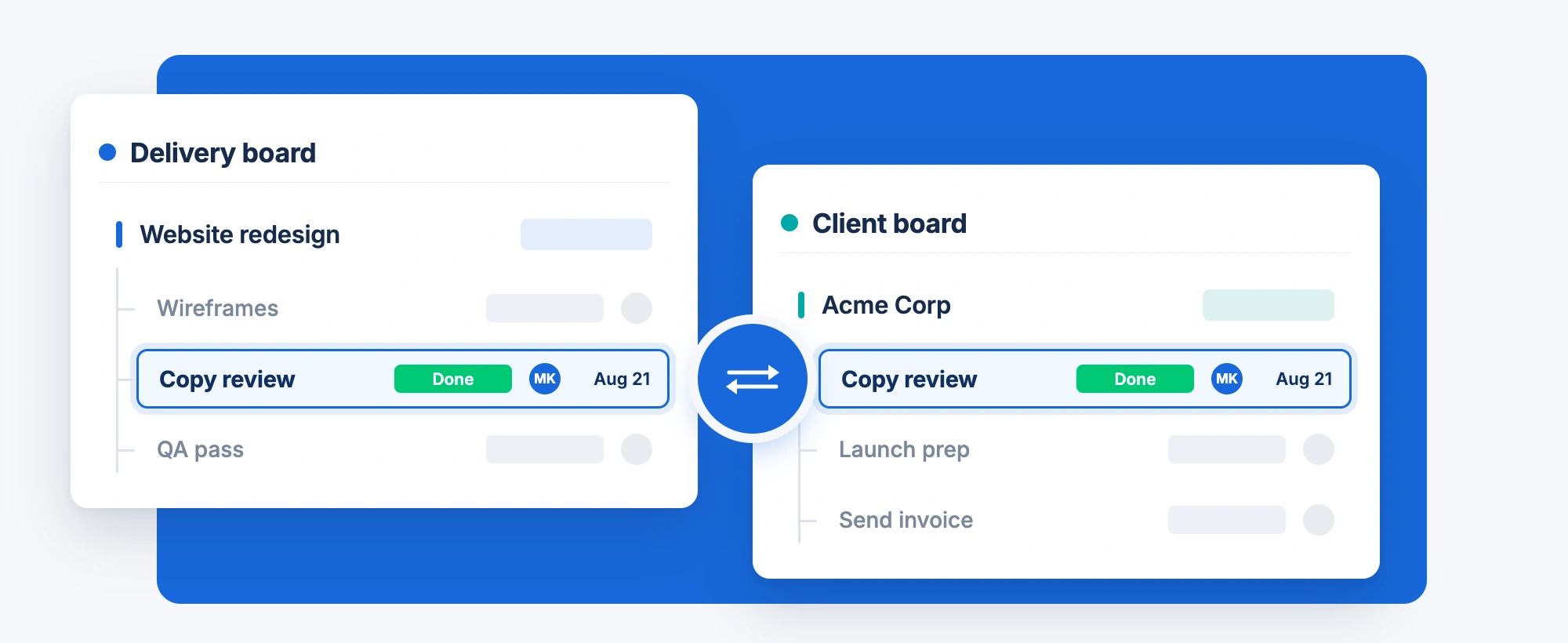
Teams around the globe run on Fortimus apps





From one board to every board
No field mapping, no unlinked copies to reconcile. Setup takes about two minutes.
Website redesign
UpdatesFilesMirror ItemStep 1
Open the item
Click the Mirror Item Multiple Boards tab next to Updates and Files on any item.
Target board
Client board ▾Target group
Acme Corp ▾+ Add itemStep 2
Pick a board
Choose the target board and group, turn on updates and subitems, and click Add Item.
Delivery board
Copy review DoneClient board
Copy review DoneStep 3
It stays in sync
The same item now lives on both boards. Change it on either one and both show it.
When an item is created, mirror same item to Client board Acme Corp
AutomationStep 4
Automate the rest
Add a recipe and new items mirror themselves the moment they are created or moved.
Work from any board.
Stay in sync.
Independent copies drift. Mirror Item connects working rows across boards and keeps their shared columns aligned. Each mirrored item uses one slot on your app plan, regardless of the number of destination boards.
Editable on every board
Each board has an editable item linked by Mirror Item. Changes to shared columns sync across the linked items, so teams can work from their own boards.
Counted once, whatever the boards
An item on three boards counts as one item on your Mirror Item plan, and its subitems don’t count at all.
Two-way by default
Edits flow from every board to every other. Need one board to stay read-only? Switch that board to one-way sync.
Everything about the item, on every board
Columns, updates, subitems and group moves stay in step wherever the item lives.
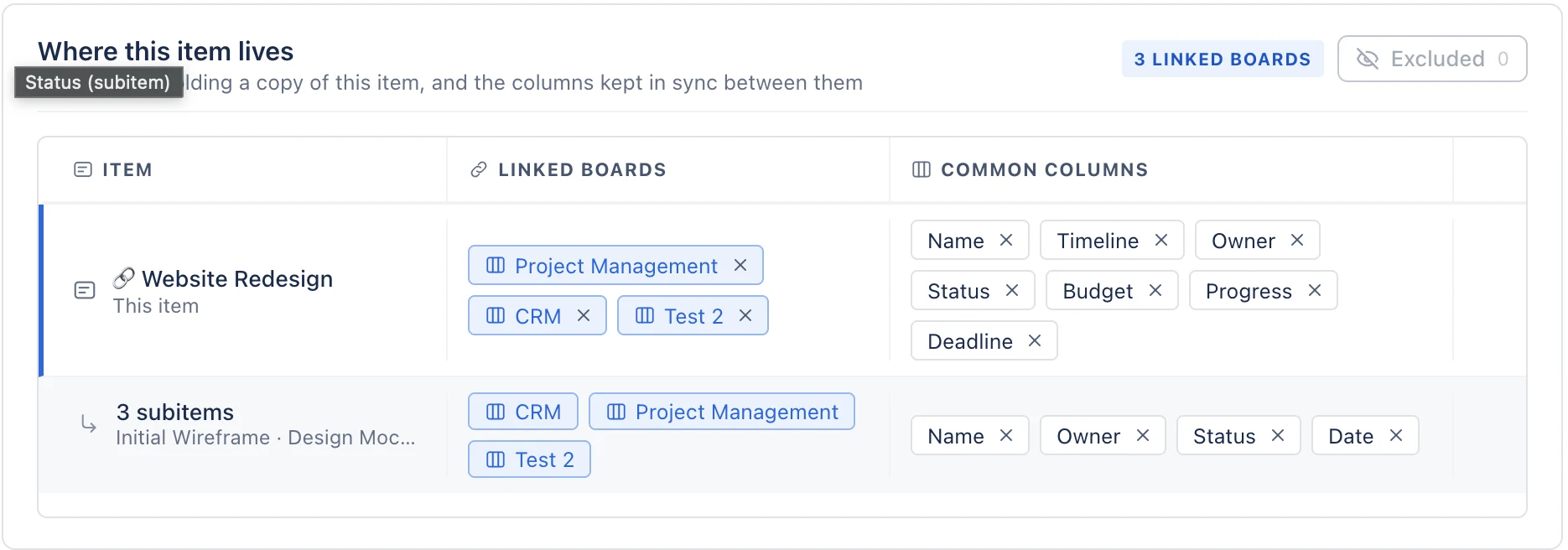
A column syncs when a column with the same name and type exists on each linked board: status, people, dates, timelines, numbers, dropdowns, files and more. There is no field mapping to set up, and group moves follow too. The Where this item lives table shows every board the item is on and exactly which columns are shared.
- Stop any single column from syncing for one item
- Formula and Auto Number columns are left alone
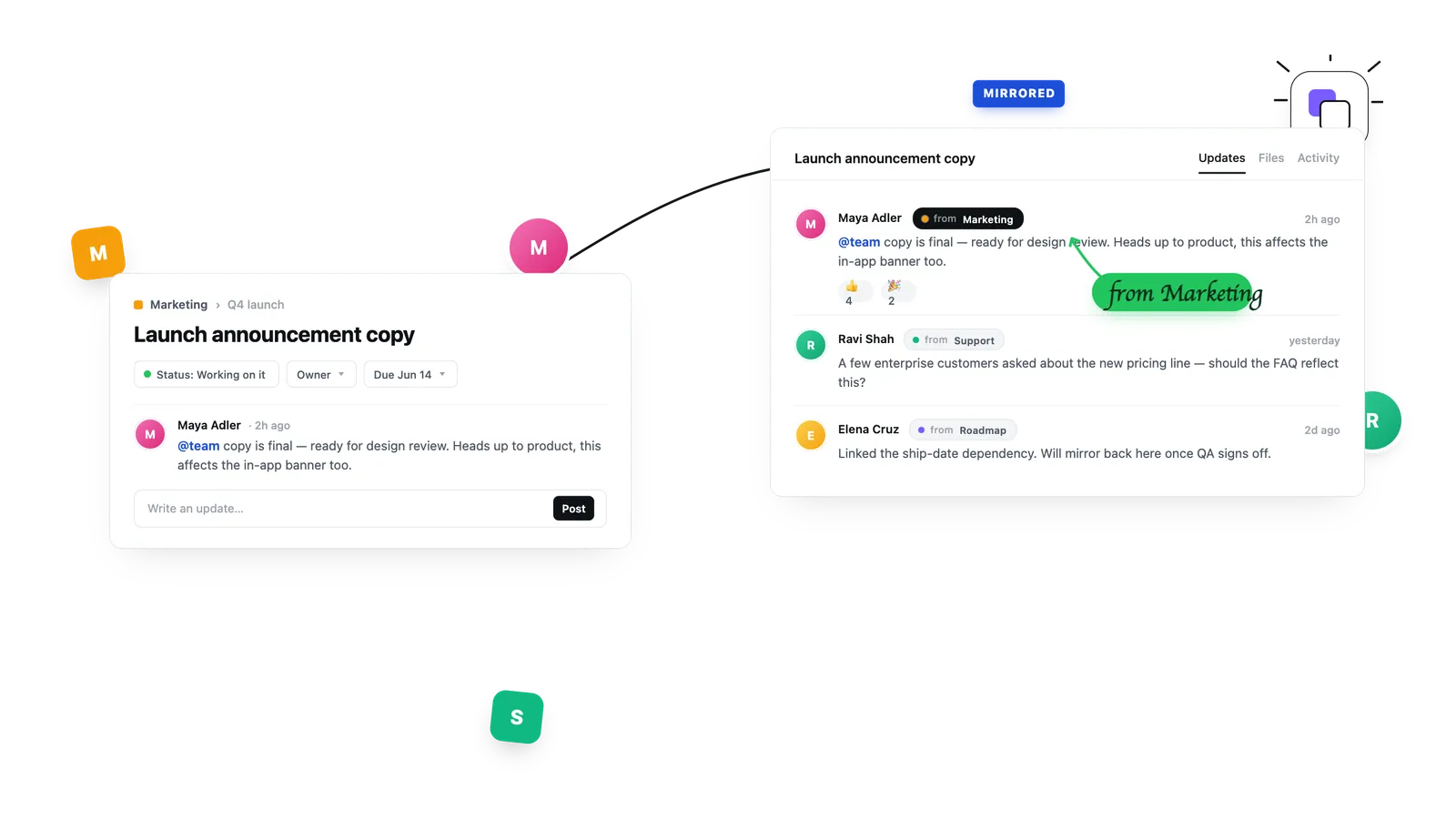
Turn on Add Updates and the existing thread comes along. New updates and replies from any board appear on every board, so nobody has to repeat themselves or ask where a decision was made.
- Edits and replies sync too, posted as the person who wrote them
- Optionally tag each synced update with the board it came from
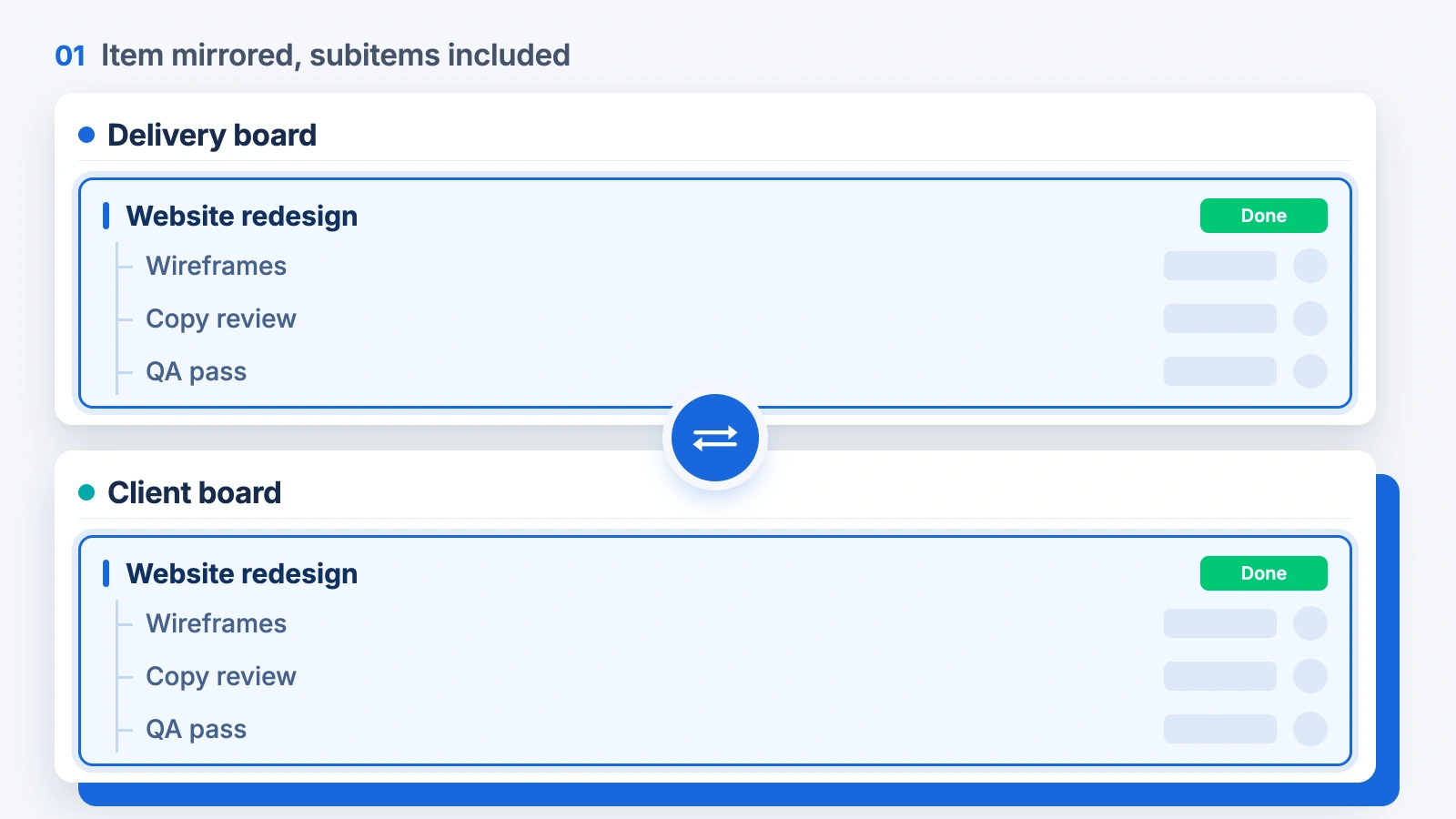
Turn on Add Subitems and the item arrives with its subitems, and they stay in sync too. You can also mirror a single subitem on its own, as a subitem or as a full item on another board.
- Names and shared subitem columns stay aligned
- Subitems never count towards your plan
Use ready-made automation recipes to mirror items the moment they are created, moved to a group or change status. Or select a batch of items and mirror them all at once from the bottom bar.
- 30+ recipes in the monday.com Automation Center (monday.com Standard plan or above)
- Bulk mirror from the Apps button in the bottom bar
What stays in sync
Everything a team needs on the item, whichever board they open it from.
Columns
Status, people, dates, timelines, numbers, text, dropdowns and more, matched by name and type.
See supported columnsUpdates and replies
The existing thread comes along, and new updates, edits and replies appear on every board.
How update sync worksWebsite redesign
Wireframes
Copy review
QA pass
Subitems
Subitems travel with their parent and stay in sync, or mirror a single subitem on its own.
How subitem sync worksGroup moves
Move the item to another group and it moves to the group with the same name on the other boards.
How groups sync📄 brief-v3.pdf
🖼️ hero-final.png
figma.com/file/…
Files and links
File, link and email columns sync like any other shared column, so attachments are on every board.
See supported columnsLinked boards
Where it lives
The Where this item lives table shows every board the item is on and which columns are shared.
Add an item to another boardOne master board
for every team
Mirror items from each team board into a single master board, manually or with a recipe on each board. Turn on the board names dropdown to see where every item came from, and edit from either side.
Build a master boardBuilt for how teams share work
One project, every team’s board
A launch item lives on the design, dev and marketing boards at once. Each team works in its own board, and everyone sees the same status.
Put an item on several boardsClient boards that stay current
Share the item on the client’s board while your team works on the delivery board. One-way sync keeps the client’s edits from coming back.
Set up one-way syncHand-offs between teams
When sales closes a deal, the same item appears on onboarding’s board with its updates, instead of a copy that goes stale.
Add the same item to multiple boardsSee it in two minutes
Watch an item go from one board to three, with its updates and subitems.
Loved by monday.com teams
average rating from 32 reviews on the monday.com marketplace
installs, and an Editor’s Choice pick on the marketplace
an item counts once on your Mirror Item plan, however many boards it lives on
“Very helpful start up process and works exactly as you need to circumvent one of the biggest flaws within Monday system.”
Security and data
What Mirror Item can see, where it runs and how admins stay in control.
- Where it runs
- Runs on monday code, monday.com’s own app infrastructure (SOC 2, ISO 27001; GDPR and HIPAA compliant). These are monday code’s certifications. There are no external servers in the loop.
- What data it uses
- Only the board data needed to keep linked items in sync: shared columns, and updates and subitems when you turn them on. Item data stays inside monday.com.
- Admin controls
- It follows monday.com board and column permissions, so people only see what they can already see. Admins choose which workspaces the app can use under Administration, Apps, and can make any board one-way.
- Visibility
- The Where this item lives table shows every board an item is linked to and which columns are shared. The user authorization table shows who has authorized the app.
Read the data and security guide Security questionnaire? Email support@fortimus.co.
Start free. Upgrade as you mirror more.
One price for your whole monday.com account, sized by how many items you mirror.
Free
Up to 5 mirrored items, to try it on your own boards. A free plan, not a time-limited trial, and no credit card.
Paid
Per monday.com account, not per seat, so one subscription covers everyone. Plans are sized by how many items you mirror, and each item counts once.
See pricingOne item on many boards still counts as one.
Add the same item to more boards. It still counts as one item on your Mirror Item plan.
Your plan would count:
With Mirror Item
100 items
Adding more boards uses no extra items from your plan.
Competitors that count each board
300 items
100 items × 3 boards.
Each extra board uses more of your item limit.
Mirror Item counts 100 items. These competitors count 300.
Your limit fills up faster with those competitors. You may need a bigger plan just to mirror the same 100 items to 3 other boards.
Recommended plan
Basic — up to 250 items
Fits your 100 items, with room for 150 more.
Price: $37 / month (as of October 2026)
View Basic planThis compares how many items each app counts. Plan prices vary. Your item limit applies to the items you have mirrored right now. How items are counted · See plans
Questions, answered
See all Mirror Item FAQsFortimus Apps
Mirror Item is better with the rest of the set
Built by the same team for the same boards. Add automations that fill monday.com’s gaps, a Drive folder for every item, and documents your clients can sign, all supported by the people who wrote them.
Includes
 Mirror Item
 Master Automations
 Google Drive Integration
 PDF Docs + eSignatures
 MasterForms
- Mirror ItemThe same item on every boardYou’re here
- Master AutomationsTrigger from mirror columns and pass values down to subitems
- Google Drive IntegrationA Drive folder for every item, with files kept in sync
- PDF Docs + eSignaturesTurn items into PDFs and Word files, then get them signed
- MasterFormsForms built from your columns, with every response an item
Stop copying items
between boards
Free plan, no credit card. Set up in two minutes.
Related guides: add the same item to multiple boards, mirror subitems in monday.com, copy subitems to another item, mirror columns vs Mirror Item, Mirror Item vs Same Item Multiple Boards, switching item-sync apps, mirror column alternative, move an item and keep it on both boards, copy an item to multiple boards, sync updates between boards, move a subitem to another board, share an item across workspaces, build a master board, Mirror Item vs VLOOKUP, VLOOKUP alternative.