How to generate Word documents from monday.com with your own template
By Arnav Ghatage, founder of Fortimus · Updated
Short answer
Write your document in Word and put a field like {{Item.Column name}} wherever an item's value should go, then upload it to PDF Docs under My own Word file. Every time you pick an item, the app fills the fields and gives you a PDF, plus the .docx. Lists of subitems, updates and connected items, images, QR codes and optional sentences are supported.
Most teams already have the document. It is a proposal, a work order, an offer letter or a certificate in Word. You do not need to rebuild it in a new editor; you only need to mark where the details go.
Turn a Word file into a template
- 1Get the fields: in PDF Docs, open Make a document, choose My own Word file, and press Fields for this board. Click a field to copy it.
- 2Write it: in Word, paste a field wherever a detail from the item should appear, such as
{{Item.Client}}. - 3Upload it: press Upload the file, drop in the .docx, give it a short name and press Save Template.
- 4Use it: it is now under Your templates on every board, for everyone on your account.
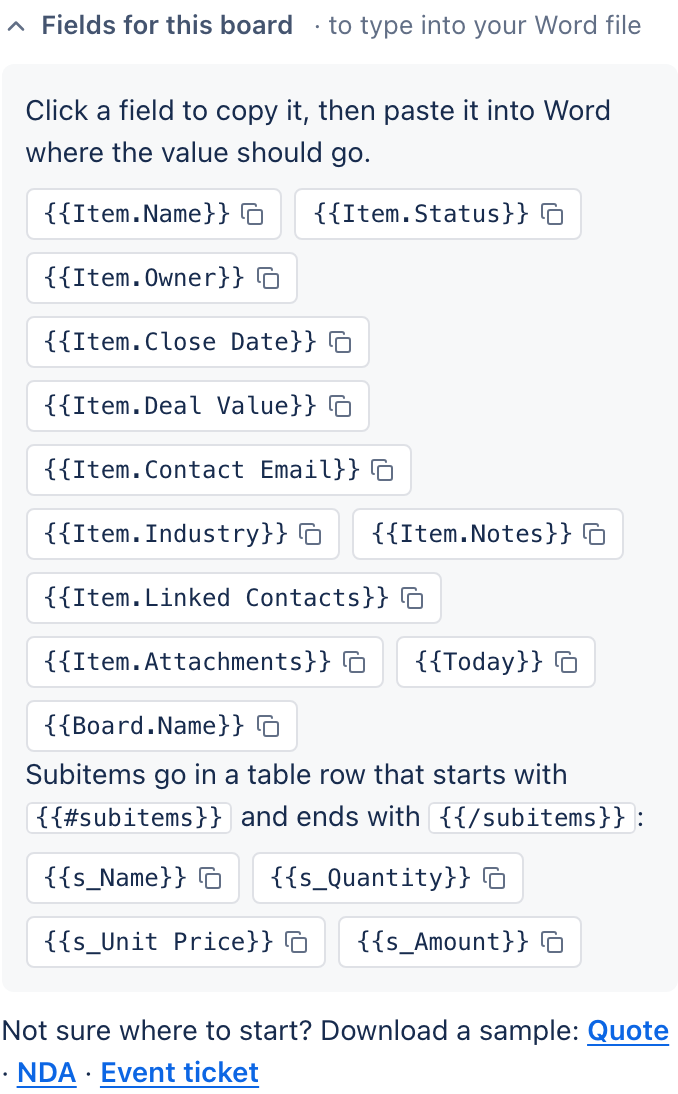
The fields you can use
| To show | Type this |
|---|---|
| A column's value | {{Item.Column name}} |
| The item's name | {{Item.Name}} |
| The board's name | {{Board.Name}} |
| The workspace's name | {{Workspace.Name}} |
| Today's date | {{Today}} |
| Your monday account's name | {{Account.Name}} |
| The person who connected the app | {{User.Name}} or {{User.Email}} |
- Use two curly brackets on each side, and start column fields with
Item. - Type the column name exactly, spaces and symbols included. Capitals do not matter for columns.
- Keep each field on one line.
- A column whose name contains
}or ends in square brackets, like "Price [USD]", cannot be used. Rename it first.
Repeat rows: subitems, updates and connected items
Make a Word table with a header row and one row for the subitems. Put {{#subitems}} at the start of the first cell and {{/subitems}} at the end of the last. Inside, use s_ plus a subitem column name.
| Item                    | Qty       | Price                          |
| {{#subitems}}{{s_Name}} | {{s_Qty}} | {{s_Unit Price}}{{/subitems}} |- Updates:
{{#updates}}{{date}}, {{user}}: {{text}}{{/updates}} - Connected items (a Connect boards column called Contacts):
{{#Contacts}}{{c_Name}}, {{c_Email}}{{/Contacts}}
Tip: Let the app build the table: in My templates, press New template, then Table for a Word file, choose the columns and press Copy for Word.
Images, links, QR codes and optional text
| To show | Type this |
|---|---|
| The first image in a Files column | {{Item.Files}} |
| A clickable link | {{Item.Website}} |
| A QR code for a link or text | {{QR.Website}} |
| A sentence only when a column has a value | {{#Item.Notes}}Notes: {{Item.Notes}}{{/Item.Notes}} |
Have a PDF form instead?
Upload the PDF under My own PDF and drag your board's columns onto the page where each value should print. Good for government forms and letterheads. PDF templates print Western European letters only and cannot hold lists; use Word for those.
Upload your first Word template and generate it from any item.
Add PDF Docs to monday.comFrequently asked questions
Can I generate Word documents from monday.com?
Yes. With PDF Docs, upload a Word template with fields, choose an item and press Make PDF. You get the PDF and the filled-in .docx.
Why is a field blank?
Check the column name is typed exactly, spaces and symbols included, and that it starts with Item. Fields like {{Today}} also need their capitals.
Why do subitem values run together?
Use a table with at least two columns for the subitem row.
Can I use the same template on several boards?
Yes. Word templates are shared across your account. Each board needs columns with the names the template uses.