 Mirror Item
 Google Drive Integration
 PDF Docs + eSignatures
 MasterForms
 Time Tracker
 Diagrams for Jira
 Smart PDF Exporter
monday.com WorkForms limitations by plan, and how to get past them
By Arnav Ghatage, founder of Fortimus · Updated
Short answer
WorkForms comes with your monday.com plan, but several features are plan-gated. Pre-fill from the link, form tags, multiple pages, the Subitems question and hiding branding need Pro or Enterprise. Response editing, password protection and pre-fill from the person's account need Enterprise. Some things no plan does, such as updating an item that is already on the board or saving a filled PDF to the item. MasterForms by Fortimus is a monday.com app that adds these: install it, add it to a board as a view, tick the columns to ask about and publish.
WorkForms is a good place to start, and for a simple request or contact form it is often all you need. The trouble starts when the form needs one more thing: a pre-filled link, a second page, line items, or a way to fix a mistake after sending.
Here is what each plan unlocks, what no plan does, and the way past each limit.
WorkForms features by plan
| Feature | WorkForms plans | With MasterForms |
|---|---|---|
| Pre-fill answers from the link (URL parameters) | Pro, Enterprise | Pre-filled links: &p_ + the column ID. See pre-fill a monday.com form |
| Form tags (where a response came from) | Pro, Enterprise | &ref= or utm tags, counted on the Dashboard |
| Pre-fill from the person's monday.com account | Enterprise | Not offered: use a pre-filled link, or a default answer |
| Multiple pages | Pro, Enterprise | Pages, with rules that skip a page. See sections and pages |
| Subitems question | Pro, Enterprise, one per form | A Subitems question with its own subitem form. See subitems from a form |
| Hide WorkForms branding | Pro, Enterprise | No "Powered by" footer |
| Response editing | Enterprise. Up to 10 edits for people outside the account; no Signature or Connect Boards edits | Edit links, with your own edit limit or none. See edit a form response |
| Password protection | Enterprise | Require a password |
Note: Plan details for WorkForms come from monday.com's help center (support.monday.com), checked on 26 November 2026. monday.com can change them, so check there for your plan.
What WorkForms doesn't do on any plan
- Update an item that is already on the board. Each submission creates a new item, and Response editing only reopens a response the form received. See update an existing item with a form.
- AND rules, rules on numbers, dates or text, page skips and dependent dropdowns. monday.com's help describes OR rules on Single-select, Multi-select and True/False questions. See conditional logic in monday.com forms.
- A filled PDF on the item. The person who submitted can export their own response to PDF, but the settings don't save one to the item or fill your own document. See monday.com form to PDF.
One more catch: People and Connect Boards questions need Require login, so only members of your account can fill in that form, unless an admin lets public forms show People.
Getting past the limits with MasterForms
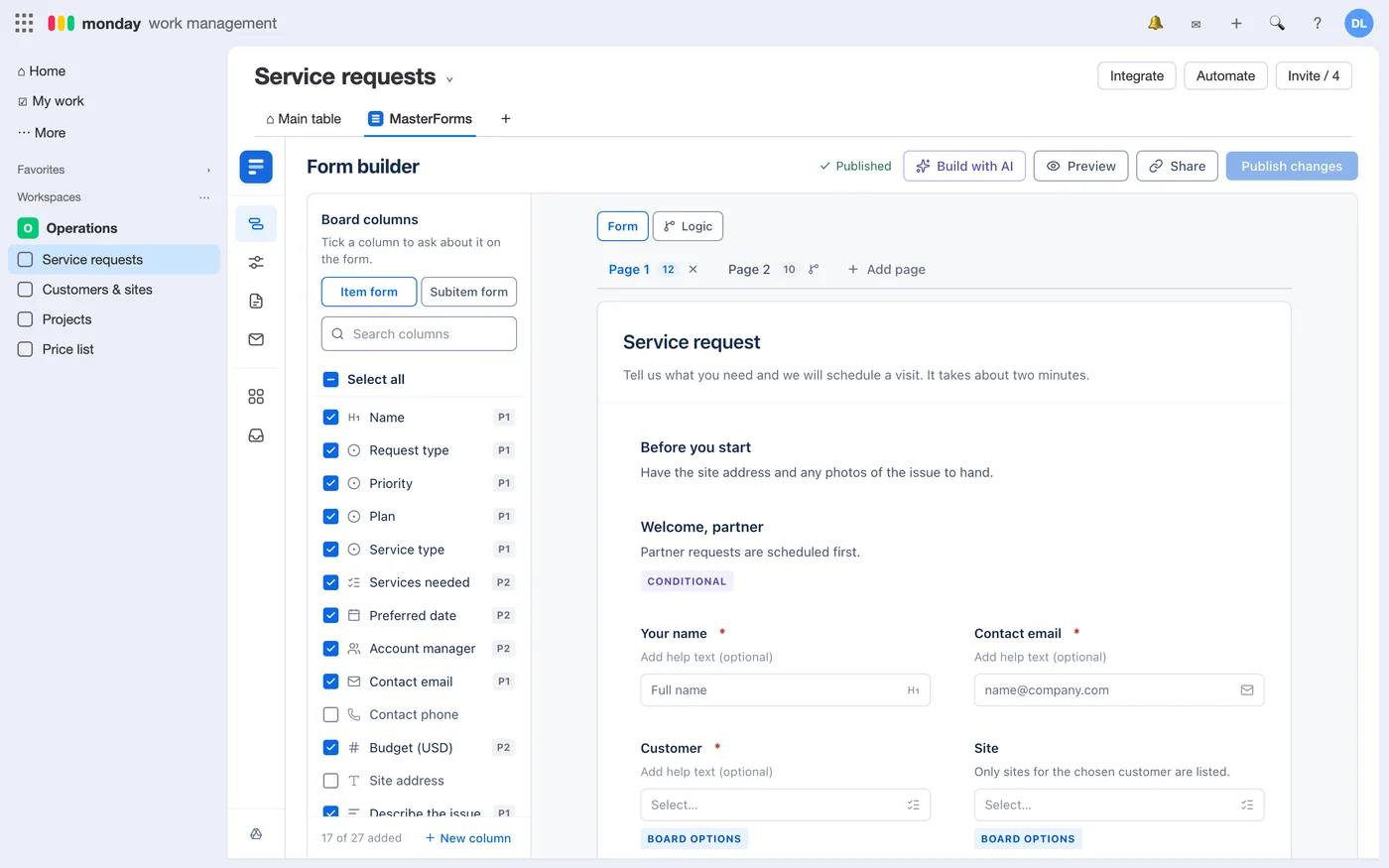
MasterForms by Fortimus is a separate app on the monday.com marketplace, listed as MasterForms AI: Advanced Forms. Like WorkForms, it builds a form on a board and saves each response as an item. Its features are part of the app, not of WorkForms, so WorkForms' plan limits don't apply to them.
- 1Install MasterForms from the monday.com marketplace, where it is listed as MasterForms AI: Advanced Forms. On your board, click + next to the views, choose Apps, then MasterForms, and press Connect to monday once.
- 2Build the form: tick the board columns you want to ask about, press Start from a template, or describe the form and let AI build it.
- 3Turn on what you need in Form settings: editing and updating items on the Editing tab, an example pre-filled link on Responses, and a password on General.
- 4Publish, then press Share for a link, a QR code or the code to put the form on your website.
Side by side
| MasterForms | WorkForms | |
|---|---|---|
| Filled in without a monday.com account | Yes | Yes |
| Conditional logic | AND/OR on any answer, page skips, dependent dropdowns | OR rules on choice questions |
| Update items already on the boardMasterForms: find your answers, private item links or the item card | Yes | No |
| Let people edit their response | Yes | Enterprise |
| Pre-filled links | Yes | Pro, Enterprise |
| Multiple pages | Yes | Pro, Enterprise |
| Subitems | Yes | Pro, Enterprise |
| Password | Yes | Enterprise |
| Save and finish later | Yes | Yes |
| Filled PDF on the item, with the signature | Yes | No |
Which to use
Stay with WorkForms for simple forms that only add items and fit your plan. Add MasterForms when you need one of the features above that your plan doesn't include, or when the form must update items, follow AND/OR rules or produce a signed PDF. You can use both: each MasterForms form is its own board view, and your WorkForms keep working.
Get past WorkForms' limits on your board.
Get MasterForms on monday.comFrequently asked questions
What is the difference between monday forms and WorkForms?
WorkForms is the name of monday.com's built-in form builder, and "monday forms" usually means it. Marketplace apps such as MasterForms by Fortimus are separate products that also turn a board into a form.
Is WorkForms free?
monday.com says WorkForms is currently part of your monday.com plan, and that some features may need payment in the future. Several features need the Pro or Enterprise plan.
Which WorkForms features need the Enterprise plan?
Response editing, password protection and pre-filling answers from the person's monday.com account.
Which WorkForms features need the Pro plan?
Pre-fill from URL parameters, form tags, multiple pages, the Subitems question and hiding branding are on the Pro and Enterprise plans.
Can I edit form responses in monday.com without Enterprise?
Not with WorkForms. With MasterForms, turn on Let respondents edit their submission in Form settings → Editing, and each person gets a private link to change their answers.
Does MasterForms replace WorkForms?
It doesn't have to. Each MasterForms form is its own board view, so you can keep simple WorkForms and use MasterForms where you need more.
Do people need a monday.com account to fill in a MasterForms form?
No. Anyone with the link can fill it in, unless you add a password. Only team forms, which open inside an item in monday.com, need a monday.com account.
Who makes MasterForms?
MasterForms is built, sold and supported by Fortimus (fortimus.co). It is listed on the monday.com marketplace as MasterForms AI: Advanced Forms. Its optional AI features, such as building a form from a description, translating it and sorting responses, use Claude Haiku by Anthropic.