 Mirror Item
 Google Drive Integration
 PDF Docs + eSignatures
 MasterForms
 Time Tracker
 Diagrams for Jira
 Smart PDF Exporter
How to split a monday.com form into sections and pages
By Arnav Ghatage, founder of Fortimus · Updated
Short answer
In monday.com WorkForms, text blocks can head each section, but multiple pages are on the Pro and Enterprise plans. With MasterForms by Fortimus, press Add page to start a new page, move questions with ⇄ Move to another page, and head each section with a Text block from Add to this page. People see a "Step 1 of 2" bar with Next and Back. From page 2 on, a page can have conditions, so it is skipped for people it doesn't apply to.
A long form on one screen looks like work. Split into a few short sections, such as "About you", "Your request" and "Delivery", the same questions feel quicker, and people can see how far they have to go.
Sections in WorkForms
- Content blocks add titles, descriptions and dividers between questions.
- By default, every question is on one page. Delete the page to show questions one by one, or mix the two.
- Adding multiple pages is on the Pro and Enterprise plans.
- monday.com's help on pages doesn't describe skipping a page based on an answer.
Note: Plan details for WorkForms come from monday.com's help center (support.monday.com), checked on 26 November 2026. monday.com can change them, so check there for your plan.
Build a form with pages
- 1Install MasterForms from the monday.com marketplace, where it is listed as MasterForms AI: Advanced Forms. On your board, click + next to the views, choose Apps, then MasterForms, and press Connect to monday once.
- 2Plan the order first: a column you tick is added to the last page, and pages can't be renamed or reordered. Build the pages in the order people will fill them in.
- 3Add a page: press Add page, then tick the columns for that section.
- 4Move a question: on the question, use ⇄ Move to another page.
- 5Head each section: under the form, Add to this page has Text, Image and Divider. Use Text for a heading and a line of instructions.
- 6Publish. People see a "Step 1 of 2" bar, with Next and Back.
Important: Deleting a page (the × on its tab) moves its questions to the first remaining page, without asking. Your published form keeps them until you publish again.
Skip pages that don't apply
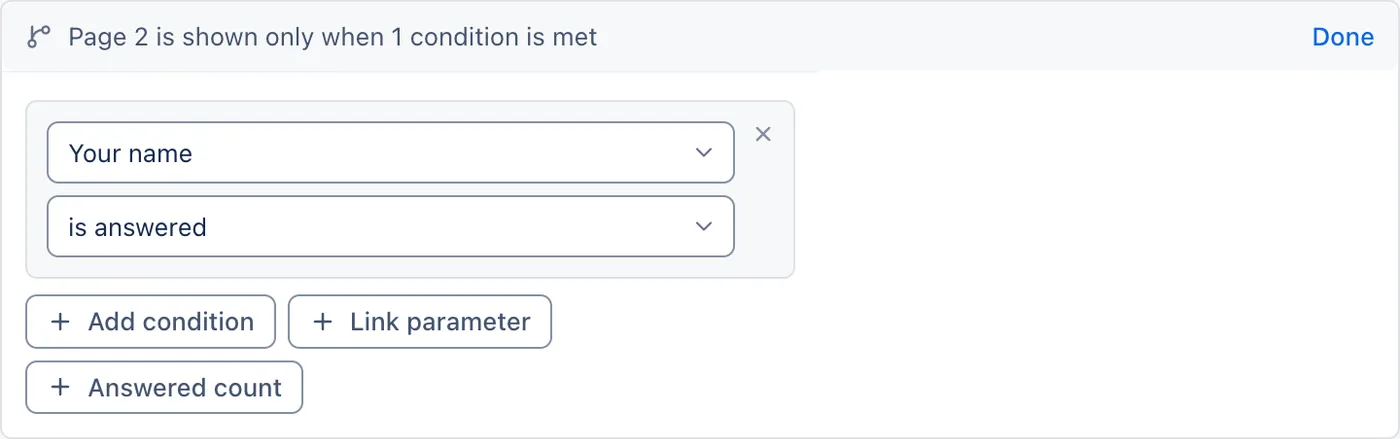
From page 2 on, click the page tab and press Add a condition in the bar above the form. Add conditions with AND or OR, such as Request type is New installation, and press Done. A skipped page is left out of the step count, Next goes straight past it, and every question on it is hidden. Page tabs with conditions show a small branch icon.
One question at a time
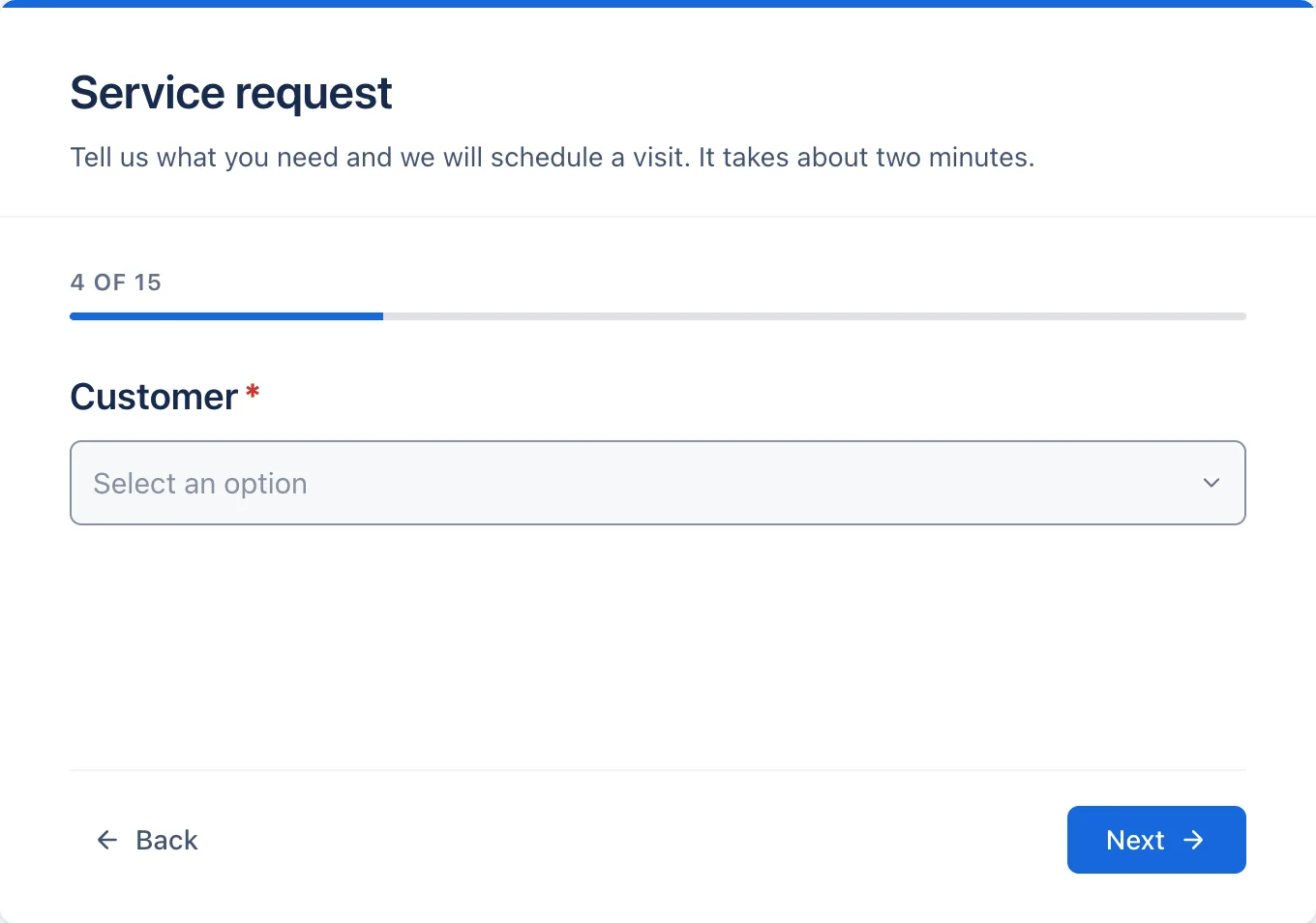
For surveys and phones, show each question on its own screen instead. In Form settings → Appearance, under Layout, turn on One question at a time. People see a progress bar such as "4 of 15", and questions hidden by rules are skipped.
Two questions on one row
Short questions, like first and last name, can sit side by side. Drag a question by its handle and drop it on another question. A row holds two questions; press Stack to put them on separate rows again.
Split your next form into clear sections.
Get MasterForms on monday.comWhich to use
| You need | Use |
|---|---|
| Headings and dividers on one page | WorkForms content blocks, or MasterForms Text and Divider blocks |
| Several pages, on Pro or Enterprise | WorkForms pages |
| Several pages when your plan doesn't include WorkForms pages | MasterForms pages |
| Pages that are skipped for some answers | MasterForms page conditions |
| One question per screen | Either: WorkForms without a page, or MasterForms One question at a time |
Pages and page conditions are in Build your first form and Show the right questions in the MasterForms help center.
Frequently asked questions
Can a monday.com form have sections?
Yes. WorkForms has content blocks for titles and dividers, and multiple pages on the Pro and Enterprise plans. In MasterForms, use pages with Text blocks as section headings.
How do I add pages to a monday.com form?
In WorkForms, add a Page content block (Pro and Enterprise). In MasterForms by Fortimus, press Add page, then move questions with Move to another page.
Can a monday.com form skip a page based on an answer?
With MasterForms, yes. From page 2 on, add a condition to the page tab and it is skipped, and left out of the step count, for people it doesn't apply to.
Which plan do I need for multiple pages in WorkForms?
Pro or Enterprise. MasterForms pages are part of the app, so WorkForms' plan limits don't apply to them.
Can people go back to an earlier page?
Yes. MasterForms forms with several pages have Next and Back buttons and a "Step 1 of 2" bar.
Can people save a long form and finish it later?
Yes. WorkForms has Save as draft. MasterForms has Save and finish later, a private link that brings the answers back on any device for 30 days.
Who makes MasterForms?
MasterForms is built, sold and supported by Fortimus (fortimus.co). It is listed on the monday.com marketplace as MasterForms AI: Advanced Forms. Its optional AI features, such as building a form from a description, translating it and sorting responses, use Claude Haiku by Anthropic.