 Mirror Item
 Google Drive Integration
 PDF Docs + eSignatures
 MasterForms
 Time Tracker
 Diagrams for Jira
 Smart PDF Exporter
How to pre-fill a monday.com form from a link
By Arnav Ghatage, founder of Fortimus · Updated
Short answer
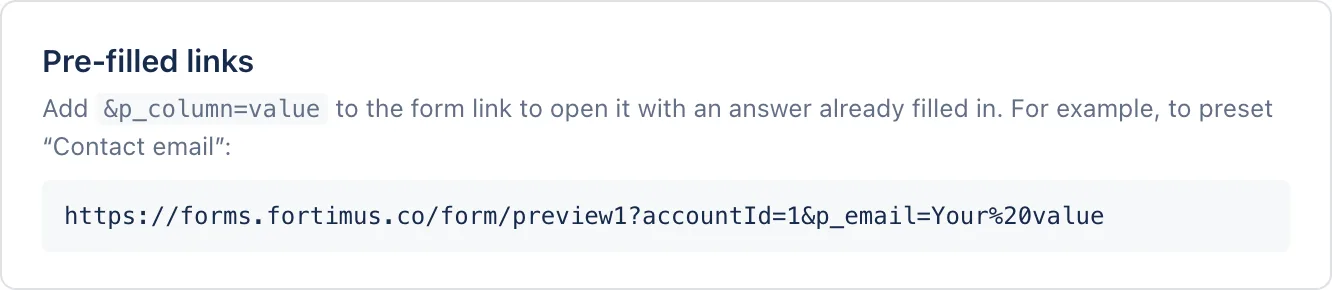
In monday.com WorkForms, pre-filling answers from URL parameters is on the Pro and Enterprise plans, and pre-filling from the person's monday.com account is Enterprise only. With MasterForms by Fortimus, add &p_ + the column's ID + = + the value to the form link, for example &p_email=dana%40example.com. The form opens with that answer filled in. Once the form is published, Form settings → Responses → Pre-filled links shows an example link for your form.
Pre-filled links save people typing and save you mistakes. Send a client a link that already knows their company. Put a different link on each poster so you know which one worked. Give partners a link that fills in where the lead came from.
How WorkForms pre-fill works
- Turn on Pre-fill value in a question's settings and choose a Source.
- URL parameter: name a parameter, then add its value to the form link, such as
source=website. On the Pro and Enterprise plans. - Account: fills questions such as the name from the logged-in monday.com user. Enterprise only.
- Form tags add a Text column that records a value from the link, to show where each response came from. On the Pro and Enterprise plans.
Note: Plan details for WorkForms come from monday.com's help center (support.monday.com), checked on 26 November 2026. monday.com can change them, so check there for your plan.
Pre-fill a MasterForms form, step by step
- 1Install MasterForms from the monday.com marketplace, where it is listed as MasterForms AI: Advanced Forms. On your board, click + next to the views, choose Apps, then MasterForms, and press Connect to monday once.
- 2Build and publish the form, then press Share and copy its link.
- 3Find the column ID of each question to fill in: turn on Developer mode in monday.labs, then open the column's menu. Or start from the example under Form settings → Responses → Pre-filled links.
- 4Add the answers to the link:
&p_+ the column ID +=+ the value. Write special characters the web way, such as%40for @ and%20for a space. - 5Send the link. The form opens with those answers filled in.
| Kind of question | What goes after the = | Example |
|---|---|---|
| Text, email, phone, number | The answer | &p_email=dana%40example.com |
| Several choices or people | The values, separated by commas | &p_dropdown=Repair,Install |
| Checkbox | true | &p_checkbox=true |
- People can still change a pre-filled answer. To fix an answer for everyone, give the question a Default answer and turn on Read only.
- Pre-filled answers apply to new responses, not to edit links.
One form, a different link for each source
Add &ref= and a name to tell links apart, such as &ref=partner or &ref=qr-reception. The Dashboard counts responses by ref, and by utm tags, under Where responses come from. A Link parameter rule can also show a question or block only for links that carry a value, such as a welcome message for partners. Add &lang=de to open the form in German, if you offer it.
Important: Anyone can change a link, so don't use link values to hide anything private.
Fill in the form from an existing item
A pre-filled link starts a new response. To open an item that is already on the board with all its current answers, and save changes back to it, use a private item link instead. See update an existing item with a monday.com form.
Send pre-filled links from your board.
Get MasterForms on monday.comWhich to use
| You need | Use |
|---|---|
| A value from the link, on Pro or Enterprise | WorkForms URL parameter pre-fill |
| A logged-in teammate's name, on Enterprise | WorkForms account pre-fill |
| Pre-filled links when your plan doesn't include WorkForms pre-fill | MasterForms pre-filled links |
| Responses counted by the link they came from | WorkForms form tags, or &ref= in MasterForms |
| An item's current answers, to change them | MasterForms private item links |
Every setting is in Thank-you message and pre-filled links in the MasterForms help center.
Frequently asked questions
Can you pre-fill a monday.com form?
Yes. WorkForms pre-fills from URL parameters on the Pro and Enterprise plans, and from the person's account on Enterprise. MasterForms by Fortimus pre-fills any question from its link with &p_ + the column ID + = + the value.
How do I pre-fill a monday.com form with URL parameters?
In MasterForms, add &p_ + the column ID + = + the value to the form link, for example &p_email=dana%40example.com. Separate several choices with commas, and use true for a checkbox.
Which monday.com plan do I need to pre-fill a form?
For WorkForms, URL parameter pre-fill needs Pro or Enterprise, and account pre-fill needs Enterprise. MasterForms pre-filled links are part of the app, so those plan limits don't apply to them.
How do I find a column ID in monday.com?
Turn on Developer mode in monday.labs, then open the column's menu on the board. The ID is shown there.
Can a pre-filled answer be locked?
A pre-filled answer can still be changed. For an answer nobody should change, give the question a Default answer and turn on Read only.
Can I pre-fill a form from an existing item?
Yes, with a MasterForms private item link. It opens the item with its current answers, and saving updates that item.
Who makes MasterForms?
MasterForms is built, sold and supported by Fortimus (fortimus.co). It is listed on the monday.com marketplace as MasterForms AI: Advanced Forms. Its optional AI features, such as building a form from a description, translating it and sorting responses, use Claude Haiku by Anthropic.