 Mirror Item
 Google Drive Integration
 PDF Docs + eSignatures
 MasterForms
 Time Tracker
 Diagrams for Jira
 Smart PDF Exporter
How to create subitems from a monday.com form
By Arnav Ghatage, founder of Fortimus · Updated
Short answer
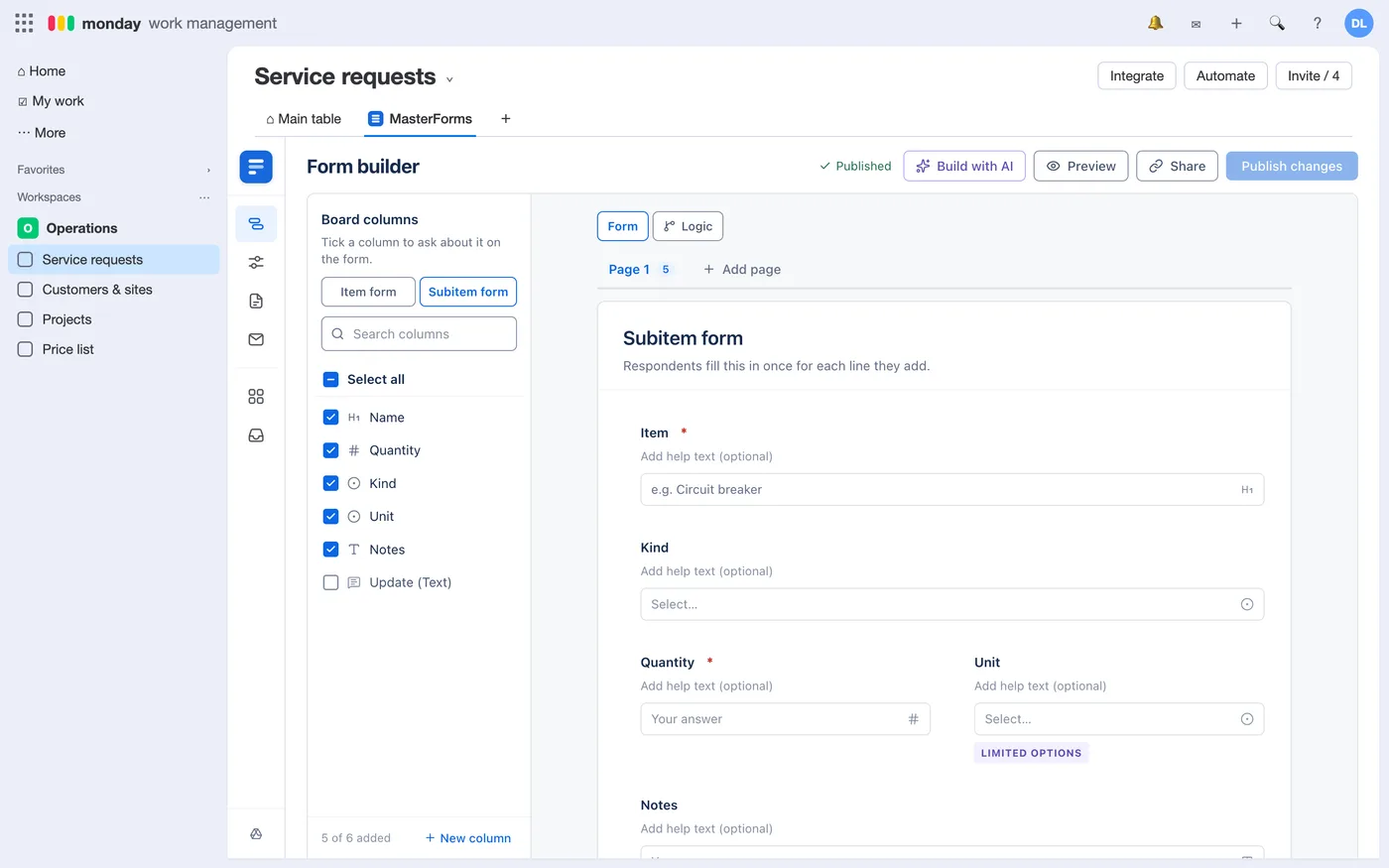
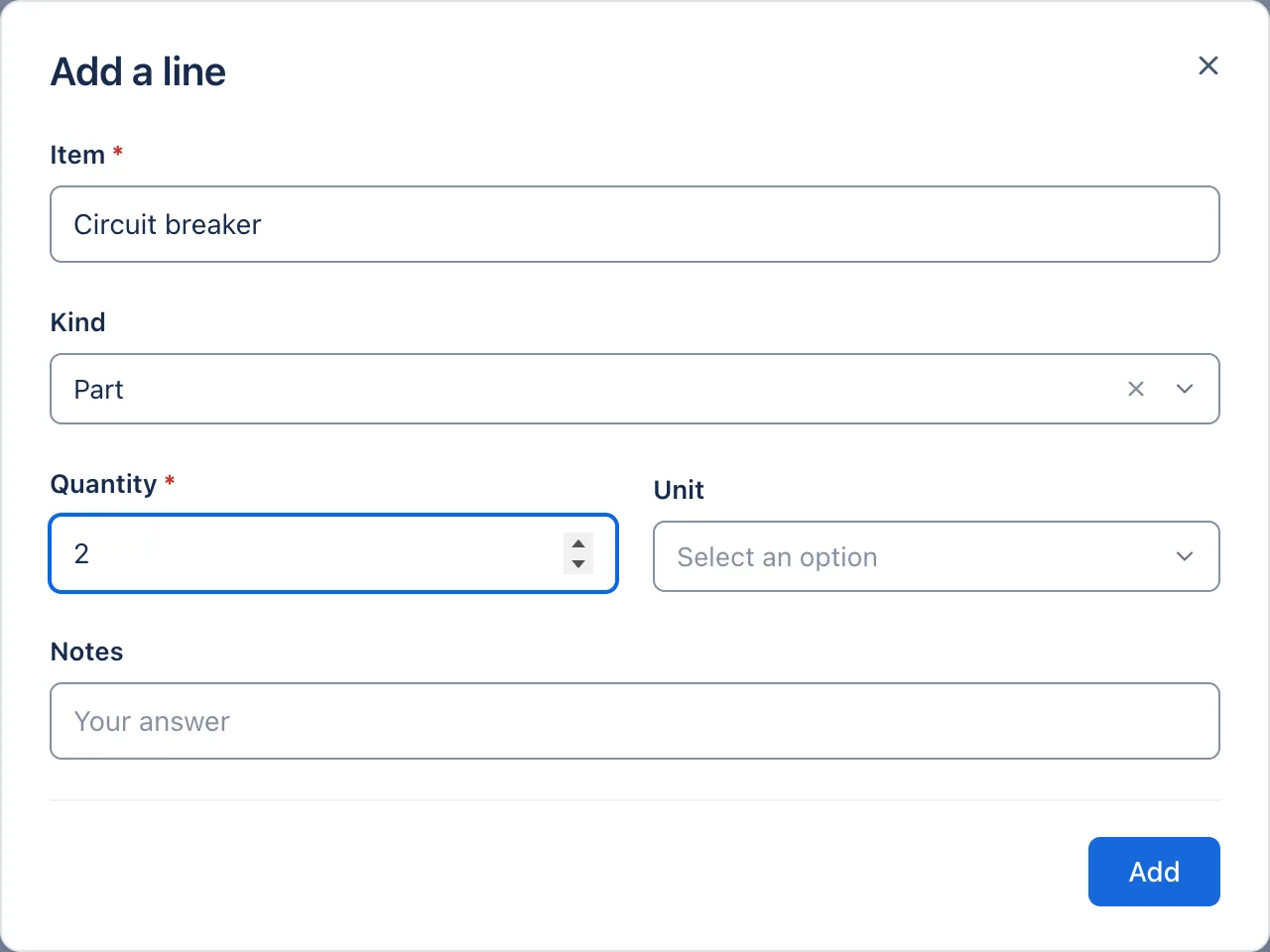
In monday.com WorkForms, the Subitems question is on the Pro and Enterprise plans, and a form can have only one. With MasterForms by Fortimus, tick your board's Subitems column, switch to Subitem form and tick the subitem columns to ask about (for example Product, Quantity and Unit), then switch back to Item form and publish. On the form, people press Add for each line, and every line becomes a subitem of the new item.
Order forms, quotes, expense claims, inspections and group bookings share one shape: a request with a list of lines. On a monday.com board, that is an item with subitems.
The form should let people add as many lines as they need, ask the same few questions for each one, and save them as subitems under the new item.
What WorkForms does with subitems
- A Subitems question puts answers into the subitems of the new item.
- It is on the Pro and Enterprise plans.
- Each form can have one Subitems question.
- Signature and Connect Boards questions aren't supported inside it.
- Subitem columns, labels and limits are set up on the board, not in the form.
Note: Plan details for WorkForms come from monday.com's help center (support.monday.com), checked on 26 November 2026. monday.com can change them, so check there for your plan.
Build a form with line items, step by step
- 1Install MasterForms from the monday.com marketplace, where it is listed as MasterForms AI: Advanced Forms. On your board, click + next to the views, choose Apps, then MasterForms, and press Connect to monday once.
- 2Add the Subitems question: tick your board's Subitems column. If the board has none, add a subitem to any item first.
- 3Choose each line's questions: at the top of the column list, switch to Subitem form and tick the subitem columns to ask about, for example Product, Quantity and Unit.
- 4Set how many lines: make the Subitems question Required to ask for at least one, and use At least and At most if you need a range.
- 5Switch back to Item form, finish the rest of the form and publish.
Make each line smarter
- Rules on each line: subitem questions can have their own conditions, dependent dropdowns and default answers. A rule on a subitem uses questions on the same subitem.
- The right unit for each kind: a dependent dropdown can offer Each or Metres for parts, and Hours for labour.
- Live figures: a Formula question, such as a total with tax, is worked out as people type, when every column it uses is also on the form.
- A PDF of the whole request: Make a PDF from the answers gives a clean document with your logo, every answer, the subitems and the signature, saved on the item. See monday.com form to PDF.
When someone changes their order
Under When a response is edited on the Subitems question, choose whether people may Add subitems, Change existing subitems or Remove subitems. Show only subitems where shows only some lines, for example those whose Status is "Pending". The other subitems stay on the item, unseen and unchanged.
Ideas for line-item forms
| Form | Asked once, on the item | Asked for each subitem |
|---|---|---|
| Order form or quote request | Company, contact, delivery date | Product, Quantity, Unit |
| Expense claim | Your name, your manager, a signature | Date, Category, Amount |
| Site inspection | Site, inspector, visit date | Area, Condition, Notes |
| Group booking | Contact details, event | Guest name, Ticket type, Dietary needs |
Turn every line of an order into a subitem.
Get MasterForms on monday.comWhich to use
| You need | Use |
|---|---|
| A simple list of lines, on Pro or Enterprise | The WorkForms Subitems question works |
| Lines with their own rules, dependent dropdowns or a set number of lines | MasterForms |
| People should add, change or remove lines after sending | MasterForms, with edit links |
| A PDF of the request with every line, saved on the item | MasterForms |
Every setting is in Subitems and calculations in the MasterForms help center.
Frequently asked questions
Can a monday.com form create subitems?
Yes. WorkForms has a Subitems question on the Pro and Enterprise plans, one per form. MasterForms by Fortimus also lets people add as many subitems as they need, each with its own questions and rules.
Which monday.com plans include subitems in forms?
In WorkForms, the Subitems question is on the Pro and Enterprise plans. MasterForms has its own Subitems question as part of the app, so WorkForms' plan limits don't apply to it.
How do I make an order form with line items in monday.com?
With MasterForms, tick the board's Subitems column, switch to Subitem form, tick Product, Quantity and Unit, switch back to Item form and publish. Each line people add becomes a subitem of the order.
How many subitems can someone add in a form?
In MasterForms there is no fixed number. Set your own with At least and At most on the Subitems question. The subitem form can have up to 50 questions.
Can people edit their subitems after submitting?
With MasterForms edit links, yes, if you allow it. Under When a response is edited, choose whether people can add, change or remove subitems.
Can a signature go inside a subitem?
No. WorkForms doesn't support the Signature question inside its Subitems question, and the MasterForms Signature box isn't offered in the Subitem form. Put the signature on the item instead; it can be printed on the item's PDF.
Who makes MasterForms?
MasterForms is built, sold and supported by Fortimus (fortimus.co). It is listed on the monday.com marketplace as MasterForms AI: Advanced Forms. Its optional AI features, such as building a form from a description, translating it and sorting responses, use Claude Haiku by Anthropic.