 Mirror Item
 Google Drive Integration
 PDF Docs + eSignatures
 MasterForms
 Time Tracker
 Diagrams for Jira
 Smart PDF Exporter
How to add conditional logic to a monday.com form
By Arnav Ghatage, founder of Fortimus · Updated
Short answer
monday.com WorkForms can show a follow-up question when someone picks an answer to a Single-select, Multi-select or True/False question, and several rules on one question work as OR. For AND/OR rules on any kind of answer, page skips and dependent dropdowns, install MasterForms by Fortimus, click the question that should appear only sometimes, press + Add condition under Conditional logic, and choose the question, the check and the answer. Add more conditions with AND or OR, and add a condition to a page tab to skip a whole page.
Long forms lose people. Conditional logic keeps a form short: each person only sees the questions that apply to them. Ask for the site address only for repairs. Ask for a budget only for new projects. Ask "Why so soon?" only when the date is in the next few days.
What WorkForms conditional logic does
- A question can appear when an earlier Single-select, Multi-select or True/False question has a certain answer. You can pick several answers in one rule.
- Several rules on one question work as OR: the question shows if any of them is met.
- Questions with conditional logic can't be dragged to a new place in the builder.
- A rule that can't work, such as one that waits for a hidden option, shows a red logic icon and a tip.
That covers simple follow-up questions. monday.com's help article describes only these OR rules on choice questions. It doesn't describe AND between rules, rules on numbers, dates or text, rules that skip a page, or lists that narrow after an earlier answer. Multiple pages in WorkForms are on the Pro and Enterprise plans.
Note: Plan details for WorkForms come from monday.com's help center (support.monday.com), checked on 26 November 2026. monday.com can change them, so check there for your plan.
Add AND/OR rules with MasterForms
- 1Install MasterForms from the monday.com marketplace, where it is listed as MasterForms AI: Advanced Forms. On your board, click + next to the views, choose Apps, then MasterForms, and press Connect to monday once.
- 2Open the question that should appear only sometimes, for example Budget.
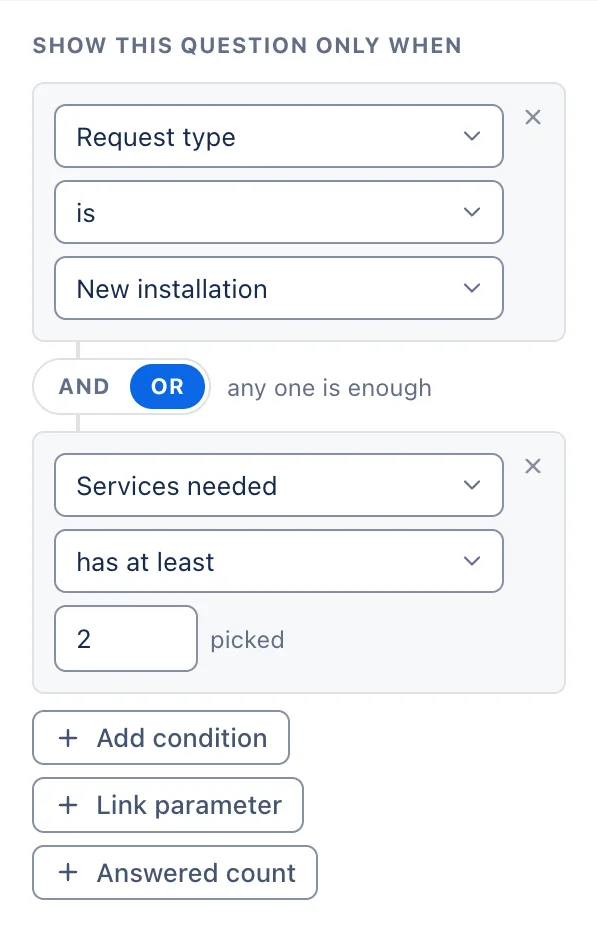
- 3Add a condition: under Conditional logic, press + Add condition. Choose the question it depends on, the check and the answer, for example Request type · is · New installation.
- 4Combine conditions: press + Add condition again and choose AND (all must be true) or OR (any one is enough). A question can have up to 20 conditions.
- 5Check the map: above the form, switch from Form to Logic. Every rule shows as an arrow, and rules that can't work are listed with what to change. Then publish.
The checks you can use
| When the earlier question is | You can check |
|---|---|
| Status | is, is not, is answered, is empty |
| Dropdown | includes, does not include, has at least N picked, is answered, is empty |
| Checkbox | is Ticked, is Not ticked |
| Number or Rating | equals, does not equal, is more than, is at least, is less than, is at most, is between, is answered, is empty |
| Date | is before, is after, is within the next N days, is answered, is empty |
| Text, Name, Email, Phone, Link | is, is not, contains, does not contain, is answered, is empty |
| People, Connect boards, Dependency | has at least N chosen, is answered, is empty |
Two more kinds of condition: + Link parameter shows a question only when the form link carries a value, such as ref is partner, and + Answered count shows it once enough questions are answered.
Skip a whole page
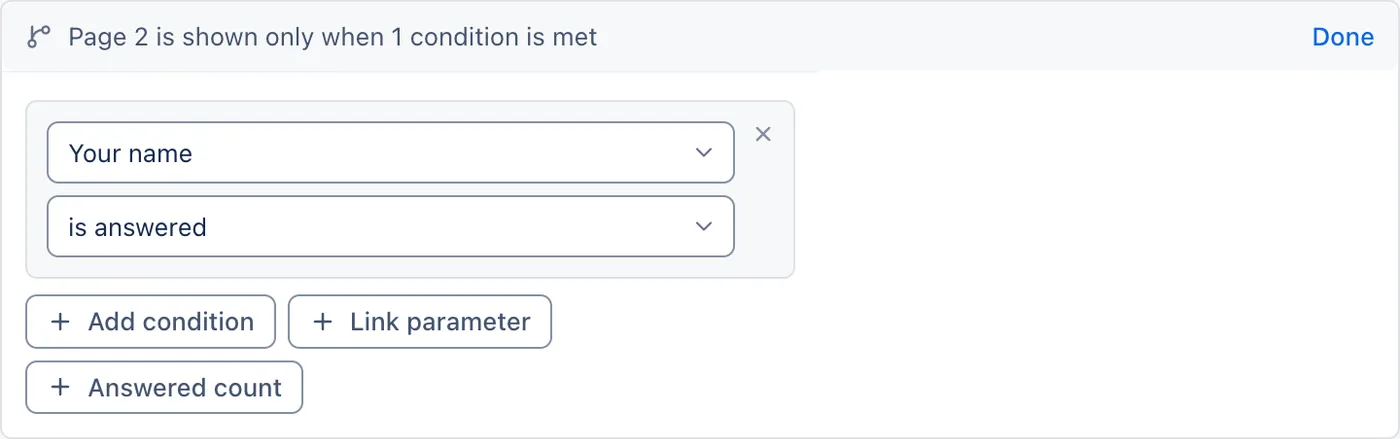
Split the form with Add page. From page 2 on, click a page tab and press Add a condition in the bar that says the page is always shown. Set the conditions with AND or OR and press Done. A skipped page drops out of the step count, Next goes straight past it, and every question on it is hidden.
Dependent dropdowns
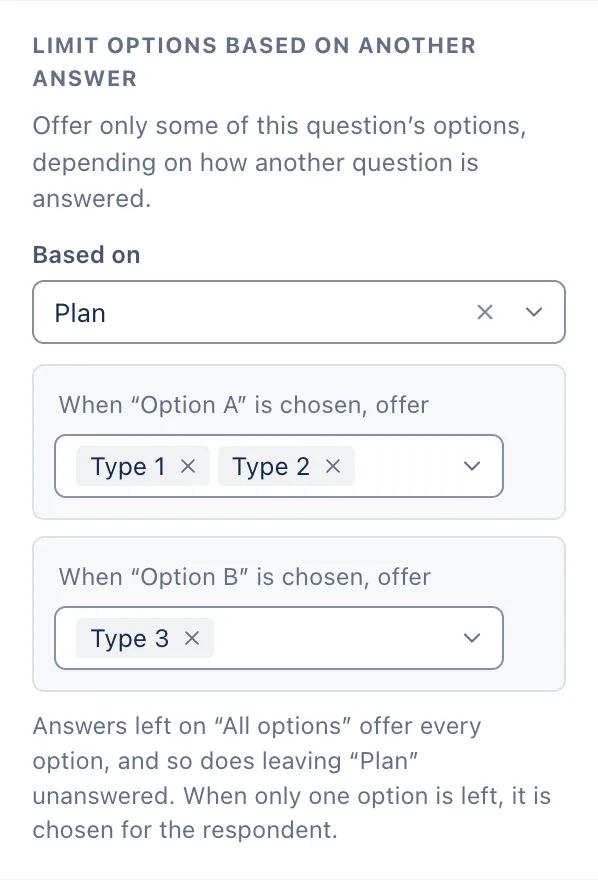
A dependent dropdown offers only some of a Status or Dropdown question's options, based on an earlier Status, Dropdown or Checkbox answer. For example, Plan "Option A" offers Type 1 and Type 2, and "Option B" offers only Type 3. Open the question, choose the earlier question under Dependent dropdown → Based on, and pick the options to offer for each answer. If only one option is left, it is picked for the person, with a short note saying why.
To fill a list from another board, such as a customer's sites, use Options from another board and filter it by an earlier answer.
What happens to hidden answers
- Hidden questions are never required.
- Answers to hidden questions aren't saved, even if they were filled in before the question was hidden.
- The rules are checked again when the response arrives, so the board only gets answers to questions that were shown.
Build AND/OR rules, page skips and dependent dropdowns on your board.
Get MasterForms on monday.comWhich to use
| MasterForms | WorkForms | |
|---|---|---|
| Show a question after a choice answer | Yes | Yes |
| Several rules joined with OR | Yes | Yes |
| Several rules joined with ANDmonday.com's help: extra rules work as OR | Yes | No |
| Rules on numbers, dates and textWorkForms rules start from Single-select, Multi-select or True/False | Yes | No |
| Skip a whole page | Yes | Not in monday.com's help |
| Dependent dropdowns | Yes | Not in monday.com's help |
Plain follow-up questions after one choice work fine in WorkForms. Use MasterForms when the logic needs AND, numbers or dates, page skips or narrowing lists. Every setting is in Show the right questions in the MasterForms help center.
Frequently asked questions
Does monday.com WorkForms have conditional logic?
Yes. A question can appear based on the answer to an earlier Single-select, Multi-select or True/False question, and several rules on one question work as OR.
Can I use AND conditions in a monday.com form?
monday.com's help describes extra WorkForms rules as OR only. With MasterForms by Fortimus, you choose AND or OR between conditions, with up to 20 conditions on a question.
Can a monday.com form skip a page based on an answer?
With MasterForms, yes. From page 2 on, add a condition to the page tab and the page is skipped for people it doesn't apply to.
How do I make a dependent dropdown in a monday.com form?
In MasterForms, open the Status or Dropdown question, choose the earlier question under Dependent dropdown → Based on, and pick the options to offer for each of its answers.
Can conditional logic use a number or a date?
In MasterForms, yes. Numbers and ratings can be checked with equals, is more than, is between and more. Dates can be checked with is before, is after and is within the next N days.
Why is my conditional question not showing?
In MasterForms, check the question's conditions and the page it is on: a skipped page hides every question on it. The Logic view lists rules that can't work, with what to change.
Who makes MasterForms?
MasterForms is built, sold and supported by Fortimus (fortimus.co). It is listed on the monday.com marketplace as MasterForms AI: Advanced Forms. Its optional AI features, such as building a form from a description, translating it and sorting responses, use Claude Haiku by Anthropic.