Docs•Last updated Mar 7, 2025
Canva + Figma Integration
Embed Canva and Figma designs directly into monday.com with live syncing and seamless collaboration.
Overview#
Embed live Canva and Figma designs directly inside monday.com board views eliminating tab switching and screenshot drift.
Follow the steps below (or watch the accompanying video) to prepare design assets and configure the board view for optimal clarity.
Step 1: Prepare Your Canva Design#


- 1Log in & open the design you want to embed.
- 2Click Share (top-right) → Embed (or “See all / More” then Embed).
- 3Copy the Smart Embed Link (this does not make the design public).
Step 1: Prepare Your Figma Design#

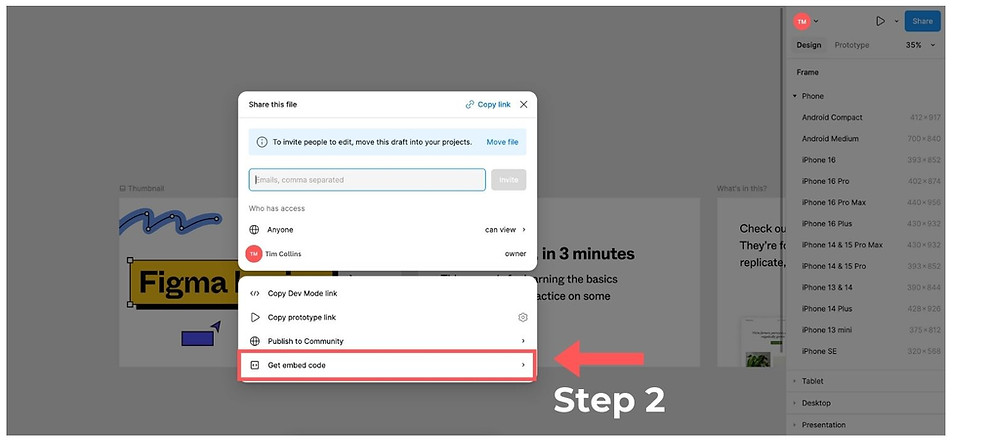

- 1Log in & open the Figma file (frame or prototype) you want to embed.
- 2Click Share → Get embed code.
- 3Copy the Embed URL (you can ignore the full iframe code, just the URL is needed).
Step 2: Set Up Your monday.com Board View#


Tip: Use a dedicated “Designs” board view to keep production task columns uncluttered.
- 1Open the board where you want to display the design.
- 2Add a new View → Choose the Canva + Figma Integration app.
- 3Paste the Canva / Figma embed URL in the URL field (gear icon opens settings if hidden).
- 4Fine-tune Width & Height (% fields default to 100). Adjust for readability.
- 5Confirm the live design renders inside the view.
Best Practices#
- Create a naming convention for embedded design views (e.g. “Design • Figma Prototype”).
- Restrict editing of embed URL to project owners to avoid accidental changes.
- Pair design view with an “Open feedback” status column to capture review cycles.
- Archive old design views quarterly to reduce noise.
Troubleshooting#
- Blank frame: Ensure the design/file is shared with the correct visibility (Canva/Figma).
- Not updating: The embed typically refreshes automatically, reload the board or re‑paste the URL if stale.
- Scaling issues: Reduce width % first, then height for better aspect ratio preservation.
- Security: Embed links don’t make the underlying file public beyond intended sharing scope.
Need More Help?#
Facing trouble? Book a short onboarding session or email support@fortimus.co with a brief Loom and board link.
Was this guide helpful?
Tell us what’s missing — doc fixes usually ship within a day.